



A job’s profit is set the day you send the estimate. Material prices still move month to month, labor is tight, and clients expect a clean, itemized quote within days. Spreadsheets can’t keep up with that.
We checked 10 construction estimating software tools and scored each one on estimate accuracy, takeoffs, cost catalogs, accounting sync and how fast a new estimator could get to a sent quote. Here’s what we found.
Quick picks
- Best overall for builders and remodelers: Buildern. Estimates turn into live budgets that track actual costs.
- Best for small teams moving off spreadsheets: Buildxact
- Best for client selections and approvals: Buildertrend
- Best for preconstruction teams using BIM: Autodesk Forma Estimate
- Best for design-build remodelers: Houzz Pro
- Best for large GCs: Procore
- Best for digital takeoffs: STACK
- Best desktop takeoff tool: PlanSwift
- Best for fast residential quotes: Clear Estimates
- Best for commercial estimating teams: Sage Estimating
Construction estimating software comparison
| Software | Best for | Starting price | Takeoff | Accounting sync |
|---|---|---|---|---|
| Buildern | Custom home builders, GCs, remodelers | $225/mo (2 users) | Yes | QuickBooks, Xero |
| Buildxact | Small builders and renovators | $199/mo | Yes | QuickBooks, Xero |
| Buildertrend | Client-facing residential builders | Quote only | Yes | QuickBooks, Xero |
| Autodesk Forma Estimate | Commercial preconstruction teams using BIM | Quote only (bundle); Takeoff $1,250/yr | Yes (2D and 3D) | Not listed |
| Houzz Pro | Design-build remodelers | Free plan; paid from $399/mo | Yes | QuickBooks (higher tiers) |
| Procore | Large commercial GCs | Quote only (by annual volume) | Yes | Many ERPs |
| STACK | Subcontractors, plan-based takeoffs | Free plan; paid from $299/user/mo | Yes | Limited |
| PlanSwift | Estimators who want desktop takeoff | $2,000/yr per seat | Yes | Via export |
| Clear Estimates | Small remodelers, quick quotes | $59/mo (annual) | AI plan upload (Pro) | No |
| Sage Estimating | Mid-size and large commercial firms | Quote only | Yes | Sage 100/300 |
Prices checked October 6, 2026, from each vendor’s pricing page or Capterra. Most vendors change prices yearly.
What to look for in construction estimating software
Good estimating software makes your numbers as reliable as your crews. Look for five things:
- Accurate, current costs. A cost catalog you can update once and reuse, with markups and margins applied automatically.
- Takeoffs from plans. Measuring quantities on a PDF or digital drawing saves hours and cuts counting errors.
- Templates and assemblies. Reusable estimates for common job types (a kitchen, a framing package, a full custom home).
- A path from estimate to budget. The approved estimate should become the job budget, so you can compare estimated and actual costs.
- Accounting sync. A two-way link to QuickBooks or Xero stops double entry and keeps job costs current.
If you also need scheduling, change orders and a client portal, pick a tool where estimating is part of a full construction management platform. If you only price work from plans, a stand-alone takeoff tool may be enough.
The 10 best construction estimating software tools
1. Buildern: best overall for builders and remodelers
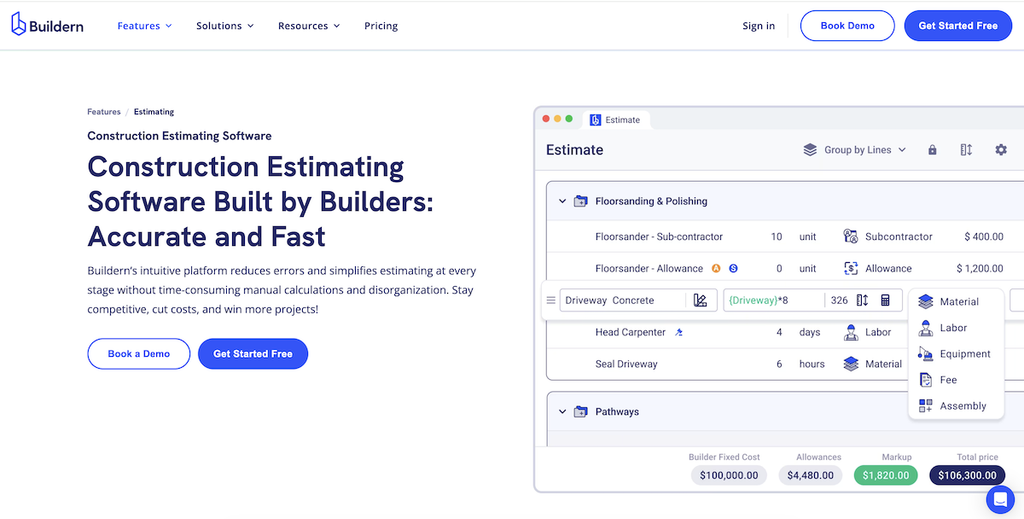
Best for: custom home builders, residential GCs and remodelers with 2–30 office users.
Starting price: $225/month for 2 users (Starter, billed annually); Professional $360/month for 4 users. Field workers, subs, vendors and clients join free.
Buildern connects estimating to every money step of a job. An approved estimate becomes a live budget that updates as bills, purchase orders and timesheets come in, so you see estimated vs. actual cost without rebuilding a spreadsheet.
Pros
- Cost catalog with reusable templates, assemblies and markup formulas
- One-click conversion from estimate to budget
- Cost-to-complete forecasting while the job runs
- Two-way QuickBooks and Xero sync
- Client-ready quotes and proposals with e-signature
- Free onboarding and training
Cons
- More than you need if you only price small repair jobs
What users say: “Customizable templates adapt to various project types. The integration of material and labor costs ensures your estimates stay current, reducing unexpected expenses.”
Verdict: the strongest choice if you want estimates tied to real job profit, not just a nicer quote.

2. Buildxact: best for small teams moving off spreadsheets
Best for: small builders and renovators.
Starting price: $199/month (Foundation); Pro $399/month; Master $599/month.
Buildxact is a cloud tool built for speed and simplicity. It’s an easy first step from spreadsheets to structured estimates.
Pros
- Drag-and-drop takeoff on PDF plans
- Supplier price-file imports
- Templates for common project types
Cons
- Basic reporting and forecasting
- Gets harder to use on large or complex jobs
- Mobile app needs work
What users say: it “meets majority requirements for minor projects,” but “reporting features could be more extensive.”
Verdict: a dependable entry-level tool. Growing companies usually outgrow its job costing and reporting.
3. Buildertrend: best for client selections and approvals
Best for: residential builders who put client communication first.
Starting price: quote only; unlimited users and projects on all plans.
Buildertrend ties estimates to client communication. You build proposals, manage selections and track approvals from one dashboard.
Pros
- Smooth proposal and estimate creation
- Client selections and approvals in one place
- Linked to scheduling and messaging
Cons
- Shallow cost reporting and forecasting
- Rigid cost-code setup for complex jobs
- Advanced estimating only on higher plans
- Long setup; price rises as you add modules
What users say: one user switching from other software said it “feels like everything is a workaround” and the “financial module lags behind QuickBooks or Xero.”
Verdict: great for client experience. Builders who need detailed cost forecasting may find the estimating side limiting.
4. Autodesk Forma Estimate: best for preconstruction teams using BIM
Best for: commercial GCs and subcontractors with a dedicated preconstruction team.
Starting price: quote only; sold only in the Forma for Preconstruction bundle. Autodesk Takeoff lists at $1,250 per year on G2.
Forma Estimate is Autodesk’s cloud estimating tool, formerly ProEst and later Autodesk Estimate (Autodesk Construction Cloud is now part of Autodesk Forma). It links costs for materials, labor and equipment to 2D and 3D takeoff quantities, so the estimate updates when drawings change.
Pros
- Estimates link directly to 2D and 3D (BIM model) takeoffs
- Central, customizable cost library for consistent pricing
- Estimates update when documents or takeoffs change
- Part of the wider Autodesk Forma platform for documents and field work
Cons
- Sold only in a bundle, with no public price
- No native QuickBooks or Xero sync listed
- Built for commercial preconstruction; heavy for residential builders
Verdict: a strong fit if your team already works in Autodesk tools and estimates from models. Small residential builders will get more from a tool that links estimates to budgets and accounting.
5. Houzz Pro: best for design-build remodelers
Best for: remodelers and designers who sell with visuals.
Starting price: free plan with estimates and invoicing; paid plans from about $399/month (per Capterra).
Houzz Pro pairs estimates with 3D floor plans, mood boards and lead generation from the Houzz marketplace.
Pros
- Takeoffs straight from a floor plan you draw
- 3D plans and renderings help close the sale
- Leads from the Houzz directory
Cons
- Job costing and financial reports only on higher plans
- Users report price rises over time
- Built around marketing more than cost control
Verdict: a strong sales tool for remodelers. Builders who need tight budget control will want more.
6. Procore: best for large GCs
Best for: commercial GCs managing large portfolios.
Starting price: quote only, based on annual construction volume; unlimited users.
Procore is built for big firms that need detailed financial workflows across many projects in one system.
Pros
- Detailed financial tracking across many projects
- Wide integration with accounting and ERP tools
- Fine-grained permissions for large teams
Cons
- High annual cost, with extra fees for added products
- Long onboarding and training
- Too much interface for small teams
- Estimating is less intuitive than in specialist tools
What users say: one user called the experience “truly awful,” citing a change in sales approach after purchase and weak support.
Verdict: fits enterprise contractors who need deep oversight and compliance. Small and mid-sized builders will find it costly and slow to set up.
7. STACK: best for digital takeoffs
Best for: subcontractors and estimators who price from plans.
Starting price: free version available; Takeoff & Estimate from $299/user/month.
STACK is a cloud takeoff tool for measuring quantities on digital plans, with real-time team collaboration.
Pros
- Accurate cloud takeoffs
- Real-time collaboration on the same plan set
- Easy to learn for plan-based estimating
Cons
- Little budgeting or financial reporting; you need a second tool for job costing
- No native accounting sync, so estimates move by hand
- Built mainly for subs, less for GCs with many cost categories
Verdict: excellent for takeoffs. It works best as one piece of a larger estimating or project management setup.
8. PlanSwift: best desktop takeoff tool
Best for: estimators who want fast point-and-click takeoff on Windows.
Starting price: $2,000/year per seat (Essential); Core $3,000/year with AI auto-takeoff.
PlanSwift is a long-standing desktop takeoff and estimating tool. Newer plans add AI tools for auto count, auto scale and a first-pass auto takeoff.
Pros
- Fast drag-and-drop takeoff with assemblies
- AI auto count and auto takeoff (Core plan)
- Training and priority support included
Cons
- Windows desktop software, not cloud
- No budgets, scheduling or client portal
- Annual license only
Verdict: a solid takeoff engine. Pair it with a platform like Buildern for budgets and job costing.
9. Clear Estimates: best for fast residential quotes
Best for: small remodelers and contractors who need quick, clean quotes.
Starting price: $59/month billed annually ($79 monthly); Pro $99/month annually.
Clear Estimates gives you prebuilt templates and a residential price database, so you can send a professional quote quickly.
Pros
- Quick setup and simple interface
- 13,000+ line-item database and 400+ templates
- AI estimates and e-signature on all plans
Cons
- Generic cost data needs manual tweaks for custom work
- No accounting integration, so no automated budgets or invoices
- Basic reporting, fit for one-off jobs
- Limited multi-user collaboration
Verdict: reliable for quick pricing. It won’t scale with a growing company.
10. Sage Estimating: best for commercial estimating teams
Best for: mid-size and large commercial contractors already on Sage.
Starting price: quote only; free trial available.
Sage Estimating is a heavy-duty estimating tool with RSMeans cost data, digital takeoff and BidMatrix for comparing bids.
Pros
- RSMeans cost data built in
- Deep assemblies and bid analysis
- Connects with Sage 100 and Sage 300 Construction
Cons
- Steep learning curve
- No public pricing
- Overkill for residential builders
Verdict: a strong pick for commercial teams in the Sage ecosystem, not for small residential builders.
How to choose the right estimating software
Here is a table to help you with the decision.
| Your company | Start with | Why |
|---|---|---|
| Custom home builder or residential GC | Buildern | Estimates become budgets with estimate-vs-actual tracking |
| Small remodeler, 1–5 people | Clear Estimates or Buildern Starter | Fast quotes at a low monthly cost |
| Design-build remodeler | Houzz Pro | 3D plans help sell the job |
| Subcontractor pricing from plans | STACK or PlanSwift | Best-in-class takeoffs |
| Large commercial GC | Procore, Autodesk Forma Estimate or Sage Estimating | Multi-project controls and deep cost data |
Three questions settle most choices:
- Do you need estimating only, or the whole job? If you also run schedules, change orders and client updates, pick a platform so the estimate flows into the rest of the job.
- Do you price from plans? If yes, test the takeoff tool on one of your own PDFs during the trial.
- What does your accountant use? Choose a tool with a two-way QuickBooks or Xero sync so job costs don’t get typed twice.
FAQ
What is the best construction estimating software?
For most small and mid-sized builders, the best construction estimating software is one that ties estimates to job budgets and accounting. Buildern does this for residential builders and remodelers. Large commercial GCs often choose Procore, Autodesk Forma Estimate or Sage Estimating.
What is the most popular construction estimating software?
Buildertrend, Procore, STACK and PlanSwift are among the most widely used. Popular doesn’t mean right for you; match the tool to your job size and workflow.
What is the best estimating software for remodeling?
Remodelers usually do best with Buildern, Houzz Pro or Clear Estimates. They offer remodel templates, quick client quotes and, in Buildern’s case, budgets that track each job’s margin.
Is there free construction estimating software?
Yes. Houzz Pro and STACK both offer free plans, and most paid tools have a free trial. Free plans usually limit users, projects or reporting.
How much does construction estimating software cost?
Most tools for small builders cost $60–$400 per month. Takeoff-only desktop tools like PlanSwift run $2,000–$3,000 per seat per year. Enterprise platforms like Procore are quote-based and priced by annual construction volume.
Can I use Excel instead?
You can, but spreadsheets break as you grow. Prices go stale, formulas get overwritten, and nothing links the estimate to the budget or invoices.
Final thoughts
The right estimating software gives you accurate numbers fast and keeps them connected to the job after the contract is signed. Pick the tool that fits your company’s size and workflow, test it on a real project, and check how the estimate flows into your budget and accounting.
See how Buildern turns estimates into live budgets.