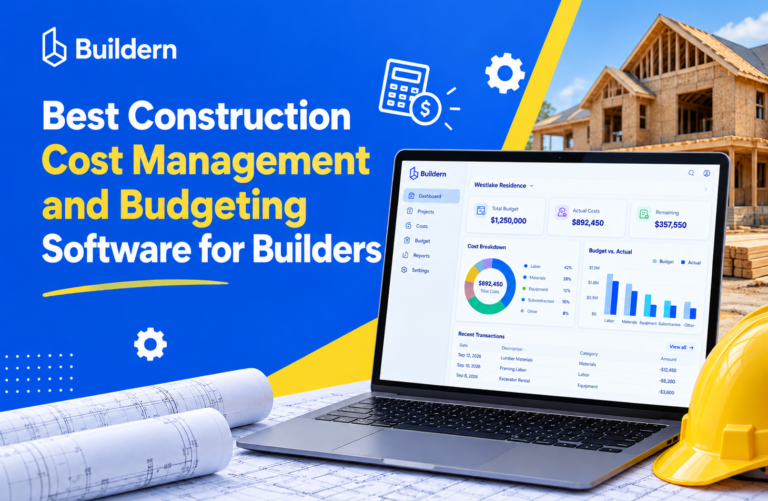
Best Construction Cost Management and Budgeting Software for Builders (2026)

Most small builders don’t lose money on the estimate. They lose it in the months after, when a lumber invoice lands in someone’s inbox, a client adds a window, and the subcontractor’s change order never reaches the budget sheet.
A spreadsheet can hold a budget. It can’t tell you, on a Tuesday afternoon, that framing on the Miller job is 12% over and the drywall PO hasn’t been billed yet. By the time someone reconciles the numbers, the money is already spent.
That’s the gap construction budgeting and cost management software fills. This guide covers what these tools do, which features matter for small and mid-sized builders, and how 7 popular options compare on features and price.
If you’re looking for how to build a construction budget itself (line items, phases, markup and contingency), start with our construction budgeting guide. This article is about the software that keeps that budget accurate once the job is running.
What is construction cost management software?
Construction cost management software turns your estimate into a working budget, then updates that budget automatically as money is committed and spent. Instead of a static file, you get a live view of where each job stands financially.
In practice, it connects three numbers for every cost code on every job:
- Budgeted cost: what you planned to spend, usually pulled straight from the estimate.
- Committed cost: what you’ve agreed to spend through purchase orders and subcontracts, but haven’t paid yet.
- Actual cost: what has been billed or paid, from supplier bills, sub invoices and crew timesheets.
The gap between those numbers is your early warning. When committed plus actual cost starts closing in on the budget before the work is done, you know about the overrun while you can still act on it.
Budgeting software vs. cost management software vs. accounting software
The terms overlap, and vendors use them loosely. Here is how they usually split:
| Tool type | Main job | Where it falls short for builders |
|---|---|---|
| Construction budgeting software | Builds the budget from the estimate and organizes it by cost code | On its own, often stops at the planning stage |
| Construction cost management software | Tracks committed and actual costs against the budget, handles change orders, forecasts final cost | Needs accurate field and bill data flowing in |
| Accounting software (QuickBooks, Xero) | Pays bills, records transactions, handles tax and payroll | Thinks in accounts, not jobs and cost codes; shows overruns after the fact |
Most tools built for small and mid-sized builders combine the first two and sync with the third. That combination is what this article compares.
8 features to look for in construction budgeting software
Every vendor claims “real-time budgets.” These are the features that decide whether that’s true for your company.
- Estimate-to-budget in one click. The approved estimate should become the budget without retyping. Every manual copy is a chance for a wrong number.
- Cost codes you control. You should be able to use your own codes or a standard like NAHB or CSI, and apply them across estimates, POs, bills and timesheets.
- Committed costs, not just actuals. Look for purchase orders and subcontracts that count against the budget the moment they’re approved. Tools that only track paid bills show problems weeks late.
- Change orders that update the budget. An approved change order should adjust both the contract value and the budget automatically, with a clear history of what changed and why.
- Bill capture from the field and inbox. Receipt photos, supplier bill scanning and sub invoices should land on the right job and cost code without someone re-keying them.
- Labor costs from timesheets. Crew hours multiplied by cost rates should flow into the budget. Labor is the line most builders underestimate, so it needs live data.
- Forecast to complete. Good tools estimate the final cost of each line based on what’s committed and spent, so you see projected margin, not just money out the door.
- Two-way accounting sync. Bills, payments and invoices should sync with QuickBooks or Xero in both directions, so your bookkeeper and project manager see the same numbers.
Nice to have for residential builders: allowance tracking for client selections, a client portal that shows approved changes, and WIP reports for your accountant or bank.
7 best construction cost management software options compared
Prices below are starting prices from each vendor’s pricing page as of October 2026. Check the vendor’s site before buying, since plans change often.
| Software | Best for | Starting price | Budget on entry plan? | Accounting sync |
|---|---|---|---|---|
| Buildern | Custom home builders and GCs who want estimating, budgets and field data in one place | $225/mo (annual, up to 5 office users) | Yes | QuickBooks, Xero |
| Buildertrend | Established residential builders and remodelers | Quote only | Yes | QuickBooks, Xero |
| JobTread | Small remodelers who want low per-user costs | $199/mo + $20 per user | Yes | QuickBooks Online |
| Buildxact | Small builders focused on takeoff and estimating | $199/mo (Foundation); POs and job management from $399/mo | No (Pro and up) | Yes, on Pro and up |
| Knowify | Trade and specialty contractors who do AIA billing | $99/mo (annual, Core) | No (Advanced, $329/mo) | QuickBooks |
| Contractor Foreman | Budget-conscious small contractors | $49/mo (annual, 1 user) | Yes | QuickBooks |
| Procore | Mid-size and large commercial GCs | Quote only (annual contract) | Depends on products bought | QuickBooks, Sage, Xero, ERPs |
1. Buildern
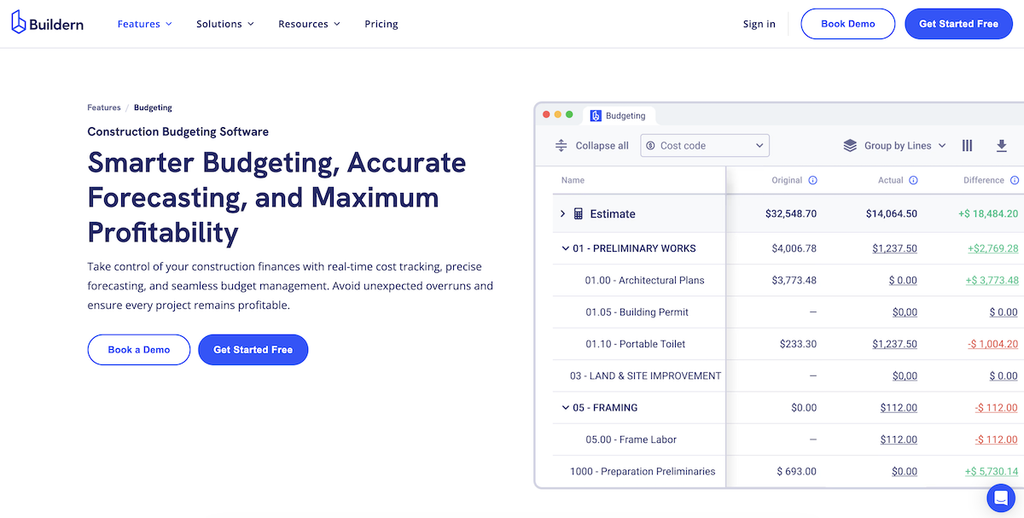
Buildern is construction management software built for custom home builders, remodelers and general contractors. Its budget is generated from the estimate and then fed by POs, subcontracts, bills and timesheets, so budget, committed and actual costs sit side by side for every cost code.
Budgeting and cost features: budget vs. actual by cost code, budget-linked purchase orders and subcontracts, AI bill scanning, real-time change order impact, allowance tracking, cost forecasting, WIP reports, and two-way QuickBooks and Xero sync.
Pricing: Starter $225/month billed annually (1–5 office users), Professional $360/month (5–30 office users), Enterprise custom. Field workers, subs and vendors are free. 7-day free trial, no credit card required.
Watch out for: if you only need a standalone budget tracker, an all-in-one platform is more than you need.

2. Buildertrend
Buildertrend is one of the best-known platforms for residential builders and remodelers. It supports cost codes with custom qualifiers, budget vs. actual, change orders, purchase orders, bills, and budget templates for fixed-price and open-book contracts.
Pricing: quote-based; the pricing page asks for your business type and annual volume. Unlimited users and projects.
Watch out for: no published prices, so it’s hard to compare cost without a sales call. Its breadth also means a longer setup.
3. JobTread
JobTread combines a cost catalog, budgets, job costing and change orders in a single plan. Every subscription gets the full feature set.
Pricing: $199/month base plus $20/month per internal user (cheaper per user as you add more), 20% off annually. Customer and vendor portal users are free.
Watch out for: accounting sync is QuickBooks Online only, so Xero users need another option.
4. Buildxact
Buildxact started as a takeoff and estimating tool for small residential builders and added job management on top.
Pricing: Foundation $199/month covers takeoff and estimating. Purchase orders, change orders, job management and accounting integrations start on Pro at $399/month; Master is $599/month.
Watch out for: budget tracking needs the Pro plan, which doubles the entry price.
5. Knowify
Knowify is built for trade contractors such as electrical, HVAC and plumbing firms, with a deep QuickBooks integration and AIA (G702/G703) billing.
Pricing: Core $99/month billed yearly ($149 monthly, 1 user) includes change orders and AIA billing. Budgeting, job costing and WIP reporting need Advanced at $329/month billed yearly (10 users).
Watch out for: the entry plan doesn’t include budgeting. Better fit for subs than for builders managing many trades.
6. Contractor Foreman
Contractor Foreman is one of the lowest-priced all-in-one options. Budgets can track budget vs. committed vs. actual by cost code, with POs, change orders, time tracking and job costing reports on every plan.
Pricing: from $49/month billed annually (Basic, 1 user) up to $332/month (Unlimited users).
Watch out for: low-tier plans limit users, so costs climb as your office team grows.
7. Procore
Procore is the enterprise standard for commercial construction. Its financials module covers budgets with a work breakdown structure, monthly forecasting snapshots, change events and commitments, plus ERP integrations.
Pricing: quote-based with annual contracts and unlimited users. Products are bundled per customer, so confirm financials are in your package.
Watch out for: priced and built for larger commercial GCs. Most small residential builders won’t use enough of it to justify the cost.
How to choose the right cost management software
The best tool is the one your team will actually feed with data every day. Use these questions to narrow the list.
1. What kind of work do you do?
- Custom homes and residential GC work: you need allowances, selections, client-facing change orders and a budget built from your estimate. Look at Buildern, Buildertrend or JobTread.
- Remodeling: fast estimating and change orders matter most. JobTread, Buildern and Buildxact (Pro) fit here.
- Trade contracting: AIA billing and labor costing come first. Knowify is built for this.
- Commercial GC with large projects: forecasting, commitments and ERP links. Procore is the usual pick.
2. How many office users will need access?
Per-user pricing adds up fast. Count office users only, then check whether field crews, subs and clients are free. On Buildern, JobTread and Buildertrend, they don’t add to the bill.
3. Is budgeting on the plan you’re actually pricing?
Several tools keep budgets and job costing off their entry plan (Buildxact Foundation, Knowify Core, Houzz Pro’s standard plan). Compare the plan that includes the features in the list above, not the headline price.
4. Does it fit your accounting setup?
If you use Xero, rule out QuickBooks-only tools. Ask your bookkeeper to sit in on the demo and check how bills, payments and cost codes map between systems.
5. Can you test it on a real job?
Use the free trial to rebuild one finished project: import the estimate, enter its POs and bills, and run budget vs. actual. If the final numbers match what you know happened, the tool works for your process.
Moving off spreadsheets without losing a job’s history
You don’t need to migrate every project at once. A simple rollout looks like this:
- Set up cost codes first. Pick one cost code list (your own, NAHB or CSI) and load it before anything else. See our guide to construction cost codes.
- Start new jobs in the software. Leave jobs that are near closeout in the spreadsheet. Only move active jobs with significant work left.
- Connect accounting on day one. Sync QuickBooks or Xero before you enter bills, so you don’t create duplicates.
- Move POs and bills into the tool. Committed and actual costs are what make the budget live. If suppliers still email PDFs to one person, set up bill capture so they land on the job automatically.
- Review budget vs. actual weekly. Pick one day for the PM and owner to go through every active job. The habit matters more than any feature.
How Buildern keeps your budget live
In Buildern, the budget isn’t a separate file. It’s built from your estimate and fed by the work your team already does:
- Estimate → budget: an approved estimate becomes the job budget, organized by your cost codes.
- POs and subcontracts → committed cost: budget-linked POs show what’s committed before the bill arrives, and warn you before you overspend a line.
- Bills and timesheets → actual cost: AI bill scanning reads supplier invoices, and crew hours feed labor costs automatically.
- Change orders and allowances → updated budget: approved changes and selection differences update the budget and the client’s contract in one step.
- Forecasts and WIP reports: see projected margin per job and share WIP reports with your accountant or lender.
- QuickBooks and Xero: two-way sync, so the office and the field work from the same numbers.
Start your 7-day free trial, no credit card needed.

Conclusion
Construction cost management software pays off when it shows an overrun while there’s still time to fix it. For small and mid-sized builders, that means picking a tool that connects estimates, POs, bills, timesheets and change orders to one budget, at a price that works for your office team. Shortlist two or three tools from the table above, test each on a finished job, and keep the one your team actually uses.
For the budgeting process itself, read our construction budgeting guide. For tracking costs after the budget is set, see construction cost tracking.
FAQ
What is the best construction cost management software for small businesses?
It depends on your work type and team size. Residential builders and GCs usually want an all-in-one tool like Buildern, Buildertrend or JobTread. Trade contractors often prefer Knowify. Very small teams on a tight budget can start with Contractor Foreman.
Can QuickBooks be used for construction budgeting?
QuickBooks can track costs by job, but it isn’t built for construction budgets. It doesn’t handle committed costs, change orders or forecasts to complete. Most builders use QuickBooks for accounting and sync it with construction software for budgets.
What’s the difference between committed cost and actual cost?
Committed cost is money you’ve agreed to spend through a purchase order or subcontract but haven’t been billed for yet. Actual cost is what has been billed or paid. Tracking both shows an overrun before the invoices arrive.
How much does construction budgeting software cost?
For the tools in this article, published entry prices run from $49 to $399 per month. Plans that include full budgeting and job costing usually start between $199 and $400 per month. Enterprise tools like Procore are quote-based.
Is construction budgeting software the same as job costing software?
They overlap. Budgeting software plans and controls the budget, including changes and forecasts. Job costing focuses on recording actual costs per job and analyzing profit. Most modern tools do both. See our guide to job costing in construction.
![Construction Estimating Software for Small Businesses: 7 Tools Compared [2026 Update]](https://buildern.com/resources/wp-content/uploads/2025/12/BLOG_COVER_Best-Construction-Estimating-Software-for-Small-Businesses-2026-768x501.jpg)