Construction Programme Software in the UK: Control Changes, Delays, and Dependencies


In the UK construction industry, the term programme means more than a simple schedule. Construction programme software doesn’t just show dates and activities, but the dynamic changes that affect the project every minute.
It’s the reason the construction programme software UK buyers typically look beyond task lists to tools that help control change once work is underway.
Unlike basic planning tools, programme of works software is designed to manage live construction conditions. This makes it fundamentally different from general, non-construction project management platforms.
In my article, I will break down the main features of the construction programme software in the UK and will review some popular tools to understand which tools fit different programme control needs.
Table of Contents
- Construction Programme Software Explained (Real Life Examples)
- Benefits of the Construction Programme Software
- How to Evaluate Construction Programme Software for the UK?
- Top 5 Construction Programme Software to Consider in 2026
- Quick Comparison: UK Construction Programme Software
- Why Construction Programme Software is a Must for UK Builders?

Construction Programme Software Explained (Real Life Examples)
Construction programme software is built to manage the programme of works throughout the construction phase.
In UK construction, a programme represents the logic behind the build, in particular how activities depend on one another, and how changes affect the handover.
Unlike simple scheduling tools, construction programme software is designed for live programme control. It’s especially critical for the UK, where the construction project delay rates have been high so far.
Recommended reading:
Where Construction Programme Software Brings Value
The difference becomes clear once construction is underway and conditions start changing.
Scenario 1: An electrical inspection is delayed, but follow-on trades remain scheduled as planned and arrive on site with no approved work areas. Crews wait or leave, creating gaps and unplanned downtime.
💡Solution: With a scheduling tool, inspections are set as dependencies, so when the delay is logged, all affected tasks shift automatically. You see the impact instantly and reallocate crews to units that are ready instead of losing productive time.
Scenario 2: Flooring and final electrical fit-off are scheduled in the same units during the same week, leading to overcrowding, damaged finishes, and rushed work. Site teams spend time resolving conflicts instead of progressing work.
💡Solution: The software makes trade sequencing visible and easy to adjust, so clashes are flagged early and work is resequenced across available units. Your teams are notified of changes before arriving on site, keeping work flowing without on-site mess.
Benefits of Construction Programme Management Software

Based on these scenarios, I can outline the following benefits:
- Faster response to delays and changes: When progress is updated, the schedule automatically adjusts to reflect impacts on dependent tasks.
- Sync with the financial part of the project: Software connects with budgeting and cost tools, so changes in the programme are instantly visible in cash flow.
- Critical path awareness: By identifying the sequence of activities that determine overall project completion, teams can manage delays before they affect the handover date.
- “Golden Thread” documentation: For UK builders, it’s important to record all updates and changes, and the scheduling tools do it.
Recommended reading:
Before reviewing the software (with these benefits in mind), let’s look at how I chose the construction programme software included in this review.
How to Evaluate Construction Programme Software for the UK?
Choosing construction programme software in the UK starts with understanding how the programme of works is actually implemented on live sites, not on a dashboard.
General project management tools stop at statuses like “planned, in progress, or completed”. Meanwhile, programme software should go much further. In the UK, where JCT and NEC4 contracts dominate, the “programme” is a legal baseline. If your software can’t prove why a delay happened and how it affected financial indicators, it’s a digital calendar.
- Start with a free trial and use it to test in real scenarios (delays, overlapping trades).
- Assess how scheduling affects the rest of the project, including whether it’s linked to financial modules.
- Look beyond scheduling to see if it is project management software as well, handling variations, retention, and document management.
- Consider built-in communication tools that notify teams automatically when changes occur and enable you to send a message within the platform.
- Ensure mobile access is available, allowing site teams and subcontractors to update progress and view changes.
- Confirm the software supports UK compliance by maintaining a clear audit trail of programme changes, approvals, and records.
Top Construction Programme Software to Consider in 2026
Having these requirements in mind, I put the most popular platforms on the list to evaluate the pros, cons, pricing model, and programme control.
#1 Buildern
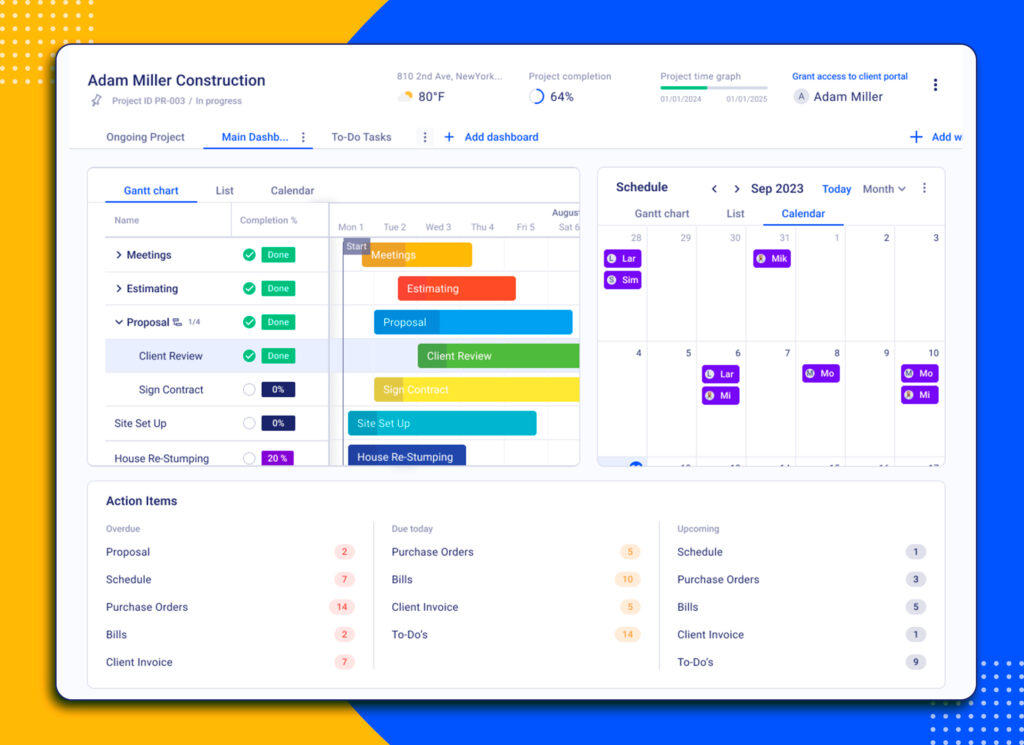
Best for: UK residential and commercial contractors who want to integrate the programme of works with project financials and administrative workflows.
Why It Wins on Programme?
Buildern approaches scheduling as part of a wider construction programme, not as a standalone planning.
Scheduling strengths for UK builders include:
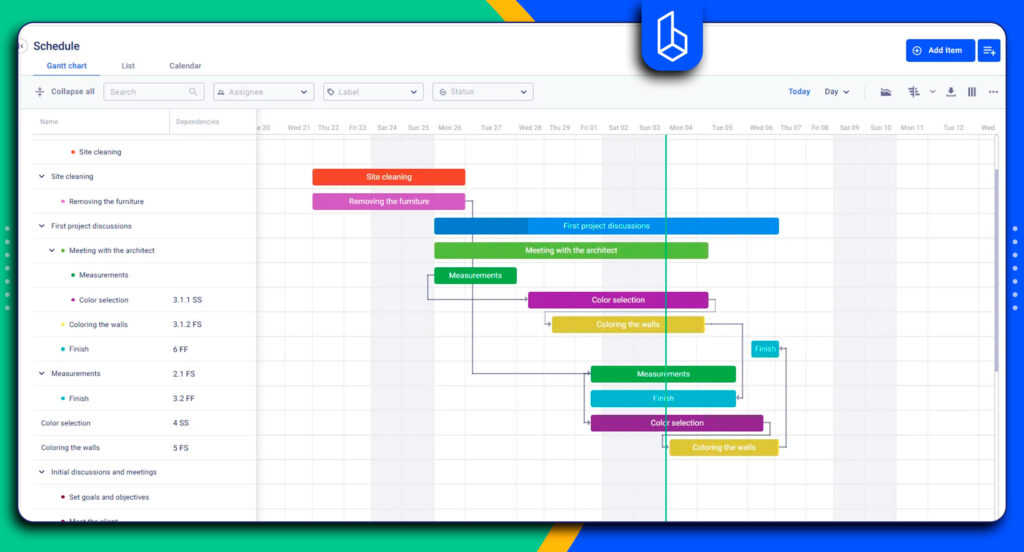
- Dependencies: Tasks are linked by real construction logic, so delays automatically cascade across dependent activities and units.
- Critical path visibility: The software highlights activities that directly affect the completion date, helping teams prioritise work that protects handover.
- Live programme updates: Progress logged from the site instantly updates the programme, keeping schedules aligned with actual conditions.
- What-if adjustments: Programme changes can be reviewed and adjusted before they impact site operations.
Beyond scheduling, Buildern functions as a full construction project management software, which is where programme control becomes practical.
Programme changes are connected to financial tracking and project planning, so adjustments in the schedule are immediately reflected in budgets, costs, cash flow, and overall delivery plans.
Recommended reading:
Features for UK Workflows
UK builders need programme schedules that connect directly to how projects are administered and paid, not tools that sit in isolation.
- Buildern handles VAT and CIS deductions.
- Software integrates with Xero and QuickBooks used by many UK contractors.
- Variation and retention are linked to budget, so you always have an accurate picture of project finances.
- Buildern links programme updates to RFIs, site diaries, and project documents, ensuring every change is tracked and auditable.
Pricing
There are three pricing plans with a seat-based pricing model.
Starter Plan: From $225/mo if billed annually. Built for small teams getting started with programme planning, scheduling, and core project controls.
Professional Plan: From $360/mo. Designed for growing contractors who need deeper financial tracking and cross-team coordination.
Enterprise: Custom quote. Intended for larger construction businesses that require 30+ seats and advanced control of their projects.
Choose Buildern if: You are a growing UK builder who needs to move fast. You want a tool that “just works” on a mobile and keeps your cash flow and programme in one place.
Read more about project management software features for the UK:
#2 Procore

Best for: UK commercial and larger residential contractors who need enterprise-grade programme management and strong reporting.
Why It Wins on Programme?
Procore combines scheduling with comprehensive project management.
Scheduling strengths include:
- Dependencies
- Critical path visibility
- Live programme updates
- What-if adjustments
Beyond scheduling, Procore functions as a full construction project management platform and also manages RFIs, submittals, variations, and inspections in one place.
Features for UK Workflows
Procore has integration with accounting systems like Xero, Sage, and QuickBooks, helping tie schedules to financial tracking. Variations and retention can be linked to budgets and contract approvals.
Cons / Considerations
- Procore is too expensive for small contractors, particularly when multiple modules are required.
- The learning curve is steep for teams new to enterprise-level construction software.
- Mobile experience is strong, but smaller site teams may find the platform heavier than simpler tools.
Pricing
The software pricing is based on the company’s revenue. UK contractors typically engage with a Procore sales rep for a tailored quote.
Choose Procore if: You are managing large-scale UK projects that need enterprise-level reporting across financials, compliance, and site operations.
#3 Archdesk
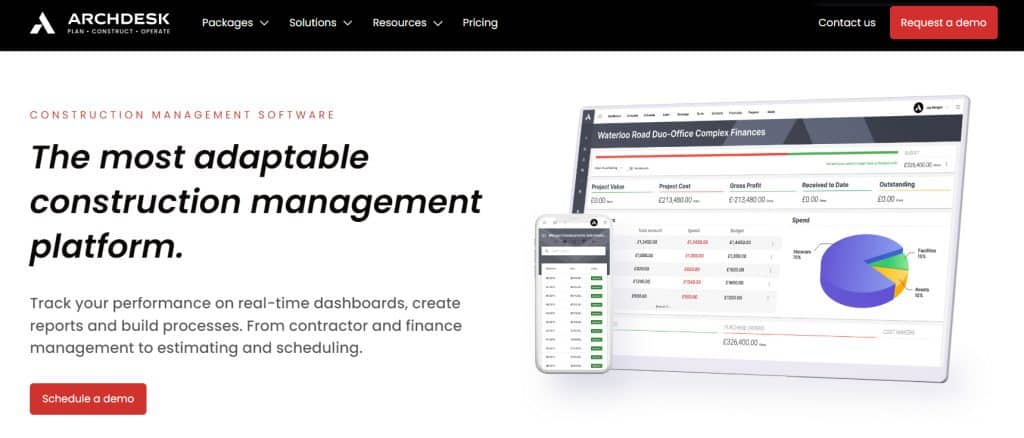
Best for: Contractors and developers who want programme scheduling tightly connected to commercial management.
Why It Wins on Programme?
Archdesk is an EPP platform that treats scheduling as part of a wider commercial and delivery programme.
Scheduling Strengths
- Automatic Scheduling
- Critical Path Analysis
- Baseline Management
- Resource & Conflict Detection
- Native Integrations:
Features for UK Workflows
As a UK-based company, Archdesk offers deep integration with Xero, Sage, and QuickBooks. It natively handles CIS (Construction Industry Scheme), UK VAT, and provides robust document management for JCT/NEC4 contract compliance.
Cons / Considerations
- The platform can feel complex for smaller contractors, particularly those focused mainly on scheduling rather than commercial control.
- Setup and configuration may require considerable time.
- Mobile usability is limited to focus on what happens on the site.
Pricing
Archdesk uses a custom pricing model, typically based on project size, modules, and number of users. The first Essential plan starts from $790/mo.
Choose Archdesk if: You manage commercially complex UK projects and need an EPP platform rather than mobile cloud-based software.
#4 Buildertrend

Best for: Home builders who want simple scheduling combined with basic project tracking.
Why It Wins on Programme?
Buildertrend focuses on residential projects where programmes are less complex.
Scheduling strengths
- Task-based scheduling
- Basic dependencies
- Live updates
- Client-facing timelines
Beyond scheduling, Buildertrend operates as a residential-focused project management platform.
Features for UK Workflows
Buildertrend offers general project management features, but it is not built specifically for UK construction practices. VAT handling, CIS deductions.
Cons / Considerations
- Many users point to a non-intuitive interface.
- Weak UK compliance support: VAT, CIS, and retention workflows require workarounds.
- Residential-only: Less suitable for commercial or multi-phase UK projects.
- Implementation time: Setup and onboarding can take longer than anticipated, particularly for teams with existing workflows or large data imports.
- No transparent fee policy: Pricing is not publicly listed, making it difficult to estimate total costs without engaging in a sales process.
Pricing
Buildertrend uses a tiered subscription model, with pricing based on features and business size. Costs can increase as more functionality is required.
Choose Buildertrend if: You are a residential builder with straightforward projects and do not require deep programme management or full UK contract compliance.
Recommended reading:
#5 Fieldwire

Best for: Site-focused contractors and project teams who need fast, mobile-first task coordination.
Why It Wins on Programme?
Fieldwire approaches scheduling from the site execution side, focusing on short-term planning.
Scheduling Strengths
- Task-based scheduling
- Short-interval planning
- Real-time field updates
- Mobile-first experience
Fieldwire integrates with tools commonly used on site, including BIM and document platforms, but has limited integration with UK accounting and commercial systems compared to EPP platforms.
Features for UK Workflows
Fieldwire supports document control but does not natively handle UK-specific commercial processes such as VAT, CIS deductions, formal variation management, or retention tracking.
Cons / Considerations
- Limited programme depth: Not designed for critical path analysis, baseline management, or complex dependency logic.
- No commercial control: Scheduling is not linked to budgets, valuations, or cash flow.
- UK compliance gaps: VAT, CIS, and contract-driven workflows require external systems.
- Execution-focused: Better suited for site coordination than full programme management.
Pricing
Fieldwire offers tiered pricing, with free and paid plans depending on feature access and team size. The plans start from $39 per user.
Choose Fieldwire if: You need a mobile-first site execution tool for daily coordination and task tracking.
Comparison: UK Construction Programme Software 2026
Let’s summarise the key features, target, and pricing of the programme software for UK builders.
| Software | Best For | Key UK Feature | Pricing (Starting) |
| Buildern | All-in-one Management | Retention, variations, CIS and VAT, document management | $225/mo |
| Procore | Enterprise/Large Projects | Extensive Enterprise Features | Custom Quote |
| Archdesk | Commercial/EPP | JCT/NEC4 Compliance | $790/mo |
| Buildertrend | Residential Remodelling | Client Portal focus | Custom Quote |
| Fieldwire | Site-Level Tasks | Short-interval planning | $39/user/mo |
Why Programme Software is a Must for UK Builders?
UK construction projects operate in an environment where changes can happen every minute. Relying on static tools in real-world conditions is not realistic anymore.
Construction programme software gives UK builders the ability to understand how work is genuinely connected on site. It is related to variations, taxes, retention, and markup calculations, along with the communication tools.
The software helps immediately see which activities are affected, what the knock-on impact will be, and where adjustments are needed.
For UK builders facing tighter margins and higher scrutiny, especially in terms of document management, it becomes essential to protect delivery dates, commercial position, and client relationships.

What Are the Best Construction Software Programs?
The best construction software combines scheduling, cost control, document management, and site communication in one platform. UK contractors benefit most from tools that link programme updates to budgets, variations, and compliance records.
What Features Should UK Contractors Look For?
UK contractors should look for dependency-based scheduling, critical path visibility, financial integration, mobile access, and support for VAT and CIS.
Which Software is Used for Scheduling in Construction?
Construction scheduling is handled by different tools, but the best are all-in-one software with extra features like financial management and communication in one place.