7 Construction Software in New Zealand: Shortlist Options for Managing Jobs End-to-End


Using construction software in the daily operations has become an industry standard in New Zealand. Like other countries, Kiwi builders face some challenges that spreadsheets and outdated tools cannot solve.
Finding and retaining skilled workers remains difficult. It means that sending requests for quotations and managing subbies should be automated.
There is no choice but to hand over the entire workflow to the construction project management software closely tied to the monitoring of all financial indicators. It’s an integrated solution for end-to-end tax management and back-costing that Kiwis look for in their daily routine.
In this review, I will list construction software in NZ that can meet all the needs of local builders with a focus on key features and workflows that address common challenges.
Table of Contents
- Why Do NZ Builders Use Construction Software?
- Key Construction Software Features NZ Builders Need
- Criteria Behind Listing Construction Software in NZ
- Top 7 Construction Software in NZ
- Construction Software in NZ: Comparison Snapshot
- Bottom Line
Construction Software in NZ: Why Builders Use It?
The New Zealand builders use construction software, as without structured reports and real-time profit tracking, keeping a project under control is nearly impossible.
The construction sector has been under significant pressure so far. The revenues have been falling, while labour shortages have been making the situation tougher. On top of that, builders must navigate strict compliance requirements, from health and safety documentation to council approvals.
Construction software changes how we used to see the operations. It saves hours of manual data entry, automates timesheets and receipts, and centralises site diaries, reports, and job costs in one place. Once anyone walks onto the site with a checklist in hand, a contractor has a single source of truth to answer almost all questions.
Some of the most common pressures Kiwi contractors face (which software helps address) include:
- Tough Admin Tasks: Builders often spend weekends reconciling receipts, chasing timesheets, or logging hours. Software automates these tasks, so your team can focus on the job.
- Real-Time Cost Visibility: Material price fluctuations and subcontractor charges affect margins fast.
- Compliance Management: Health and safety and council approvals all require documentation.
- Subcontractor Coordination: With many trades on a single project, scheduling conflicts and communication gaps are common.
For NZ builders, the main benefit is how construction software in NZ transforms fragmented job and financial management tasks into a connected and visible system, no matter if it’s a small business or a commercial contractor.
Recommended reading:
Key Construction Software Features NZ Builders Need
For New Zealand builders, construction software needs to manage jobs while bringing different aspects of financial management into one platform.
There are tight margins and strict compliance; therefore, the software has to be a compliance and financial engine tailored for NZ.
Let me show some non-negotiable features.
Cost Tracking
The software should allow Kiwi builders to track budget vs actual costs across labour, materials, and subcontractors in real time. With live back-costing, cost overruns are identified early, and profitability is constantly monitored.
Xero Integration
Construction software must integrate seamlessly rather than duplicate financial work. Most builders rely on Xero, and a two-way sync reduces manual data entry.
GST Support
Software must have local tax (GST) integration for IRD compliance. It should support both GST-inclusive and GST-exclusive pricing across budgets, invoices, variations, and reports. Thus, you will reduce manual adjustments and minimise errors during the whole project.
Variations and Retention Management
Keeping track of approved variations is critical for NZ contractors, as changes to scope, materials, or timelines directly affect budgets and schedules. A reliable construction software captures these updates and ensures costs and timelines stay accurate.
Meanwhile, the rules for holding retentions in New Zealand are strict, and a good construction software automatically calculates retention percentages from each client invoice.
Recommended reading:
Simple UI for Non-Technical Site Teams
Construction software must be intuitive enough for foremen, supervisors, and subcontractors who don’t sit behind a desk. A powerful mobile application with full functionality of a desktop tool is a must in 2026.
Criteria Behind Listing Construction Software in NZ
To make this list truly useful for Kiwi builders, I didn’t just look at the most popular software but rather focused on different segments.
- Local Tools: First comes the local software that is designed specifically for the NZ peculiarities. These tools are built specifically for the New Zealand workflow. These platforms understand local compliance, use AUD/NZD currency by default, and align with the way we manage subbies and progress claims.
- Popular Residential and Commercial Tools: Many builders don’t need a spaceship, but a tool that will not only serve the enterprise-level construction but also small and medium-sized residential and commercial contractors.
- Industry Giants: For those managing multi-million dollar infrastructure or high-density commercial builds, I included the global standards. These are the heavy solutions that handle massive data loads and complex safety audits.
- Field-First Tools: Some teams spend 99% of their time on-site, and New Zealand is not an exception. They are in the list for contractors who mostly need “field-first” apps.
Tip: Regardless of which segment you fall into, always check for two-way sync. In 2026, you shouldn’t manually export files. If your project management tool doesn’t talk directly to Xero or MYOB, it’s creating more work, not less.
Top 7 Construction Software in NZ
Which software is built with these features in mind? I have listed 7 options for New Zealand.
#1 Buildern
Best for NZ builders searching for construction software compliant with the local construction workflow.
Key Construction Project Management Tools
Buildern is an all-in-one construction project management platform in NZ, covering the full project lifecycle from preconstruction to close-out. The software can be easily used for estimating, scheduling, cost control, and communication.
Read more about project costs and how to manage them:
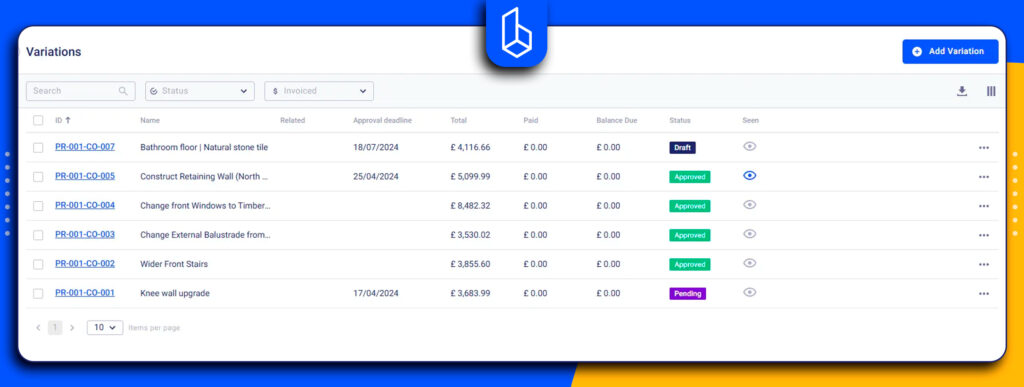
Variation Management
Changes of scopes, materials, or timelines are recorded, tracked, and approved in real time. The software ensures budgets and schedules stay accurate, and additional work is properly accounted for.
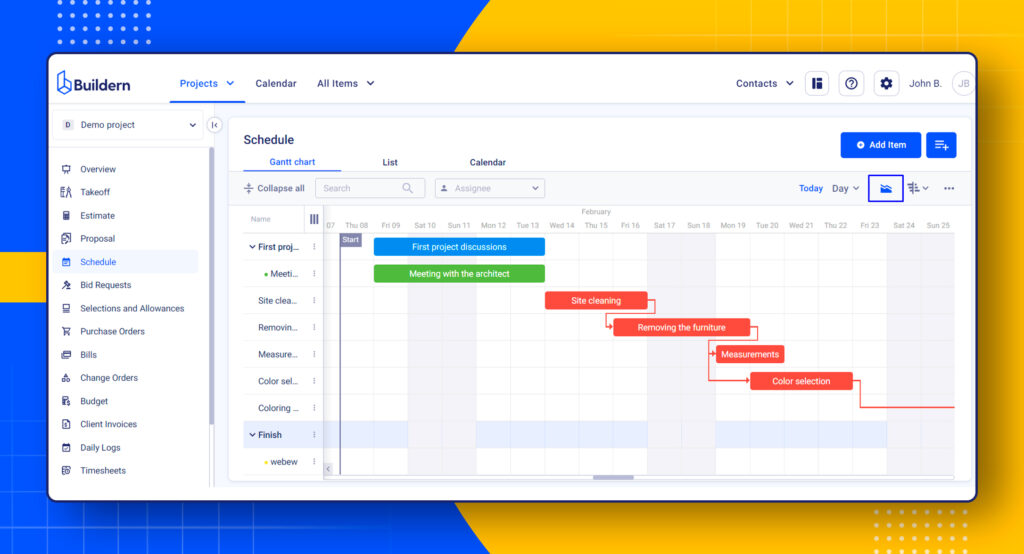
Scheduling
The software provides structured project scheduling tools. It can be viewed as a Gantt chart, a list or a calendar with task dependencies and progress tracking. Schedule updates are directly connected to job costs and site activity, allowing teams to understand how delays or changes impact both timelines and budgets.
Reporting
Project reporting in Buildern gives builders access to live data across jobs. There is no need for manual reporting, and decision-ready insights are available throughout the project, not just at the end.
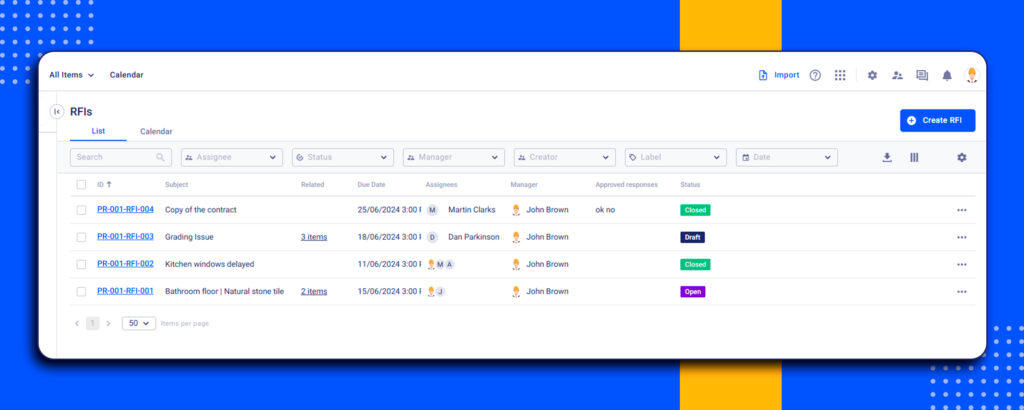
Document Control
Buildern provides a central location where all project documents are stored, organised, and easily accessible. RFIs and submittals help both residential and commercial contractors manage documents in one place.
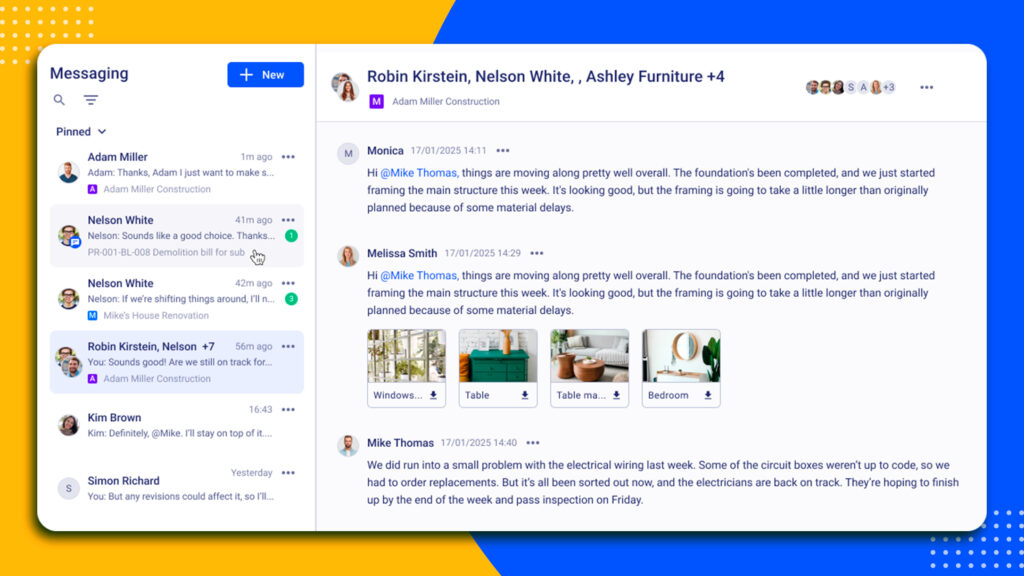
Communication
Clear communication is built into Buildern’s workflow and works at any stage of the project. Teams can share updates, documents, and site information within the platform. It offers separate portals for clients and subcontractors to be able to trace the progress, variations, and other information.
New Zealand Relevance
Buildern supports the workflows NZ builders deal with on every project. For instance, it offers live back-costing. I can track planned budget vs actual costs in real time. Besides, Buildern supports GST and invoicing, helping builders apply the correct tax treatment across progress claims, variations, and reports. This reduces the risk of errors and supports compliance with IRD requirements.
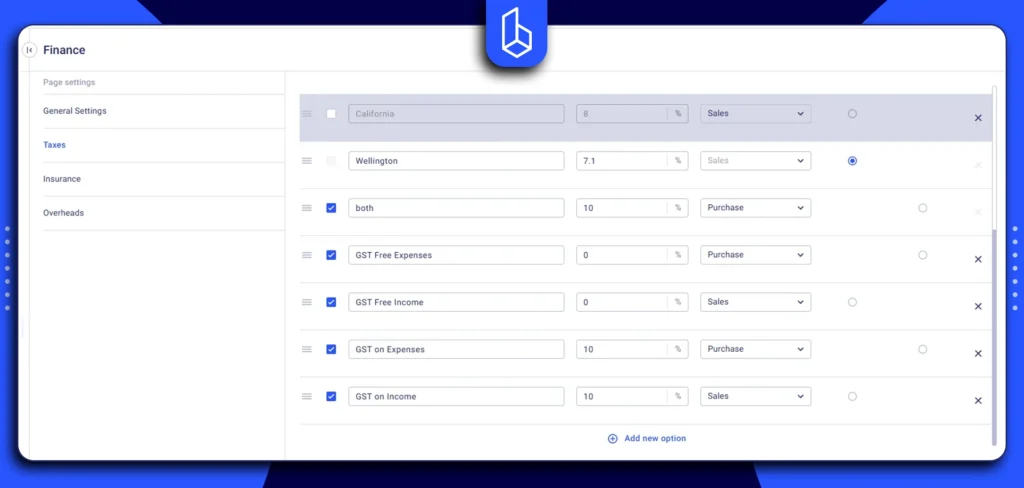
Most NZ builders rely on Xero for accounting, and two-sync integration is a win-win for contractors as invoices and payments are aligned.
Recommended reading:
Finally, Buildern allows you to set a retention percentage, which is also a critical part of NZ construction contracts. It means retention is calculated consistently, and there is a clear visibility into funds being held throughout the project.
Pricing
Three plans are for businesses of different sizes and project needs, with pricing listed in AUD:
- Starter: Starts from $315 AUD/mo billed annually for more than a dozen features
- Professional: Starts from $522 AUD per year
- Enterprise: Custom pricing for larger teams
A 7-day free trial is available before committing to any plan.
#2 Nexvia
Best for fit-out and shopfit, residential builders, and specialty contractors in Australia and New Zealand.
Nexvia delivers Aconex-based document and collaboration solutions widely used across Australia and New Zealand, especially on complex construction and engineering projects where strict document control and multi-party coordination are critical.
Key features:
- Estimating and tendering: Includes a historical library of fixtures and services, allowing teams to build accurate quotes quickly and manage tender invitations.
- Live financial tracking: Real-time budget monitoring that tracks purchase orders, timesheets, and invoices.
- Client and contractor portals: Dedicated secure portals that provide transparency by allowing clients to view progress photos and documents, while subcontractors can track work orders and submit quotes.
- Site and field tools: A mobile app with offline capability for on-site teams to manage health and safety audits and daily timesheets.
Pricing
Pricing is fully custom and not listed on the website. To get cost details, users need to book a demo or contact the Nexvia team directly.
#3 Rave Build

Best for residential builders, renovation specialists, and group home builders in New Zealand.
It is specifically designed to handle the nuances of the local market, with a focus on CRM, sales features, and project management.
Key Features:
- Sales and CRM: A powerful lead management system that includes branded showhome portals, sales pipelines, and forecasting tools.
- Scheduling: Gantt charts to keep project timelines on course while automatically notifying trades of any shifts.
- Local compliance: Features specific to NZ needs, such as health and safety checklists and site diaries.
#4 Procore
Best for medium and large-scale residential and commercial construction projects.
Procore is ideal for civil engineering, commercial builds, and other complex works in New Zealand. Its feature set supports project teams in managing safety, budgets, schedules, and documentation across multiple sites, aligning with the needs of larger contractors.
Key Features:
- Safety Management: Tools for incident tracking, inspections, toolbox talks, and compliance documentation to ensure compliance with health and safety standards on large projects.
- Project Scheduling & Financials: Advanced project scheduling with cost tracking, budgeting, and back-costing to maintain visibility on high-value builds.
- Document Control:
- Centralised storage for drawings, contracts, RFIs, and submittals.
- Collaboration & Communication: Seamless communication between office teams, site supervisors, and subcontractors through a unified platform.
Pricing
Procore’s pricing reflects its focus on large-scale projects and enterprise needs, typically starting in the high thousands per month (exact pricing is custom and depends on annual construction volume).
#5 Oracle

Best for large-scale engineering and infrastructure projects in New Zealand, including civil works, utilities, energy, and government-led developments.
Oracle’s construction management solutions are built for complex projects, such as infrastructure, energy, and large-scale commercial developments. It handles high-risk, multi-stakeholder projects where cost control, compliance, and long-term planning are critical.
Key Features
- Enterprise project controls: Advanced scheduling, cost management, and forecasting tools suited for major engineering and infrastructure projects.
- Risk and cost management: Strong capabilities for managing budgets, cost overruns, change events, and long project lifecycles.
- Data-driven insights: Powerful reporting and analytics for performance tracking, earned value management, and executive-level oversight.
Pricing
Oracle is positioned at the enterprise end of the market. Pricing is typically high and tailored to the scale and complexity of the project. The pricing is not available on the website, and you need to send an inquiry for a custom quote.
#6 Buildertrend
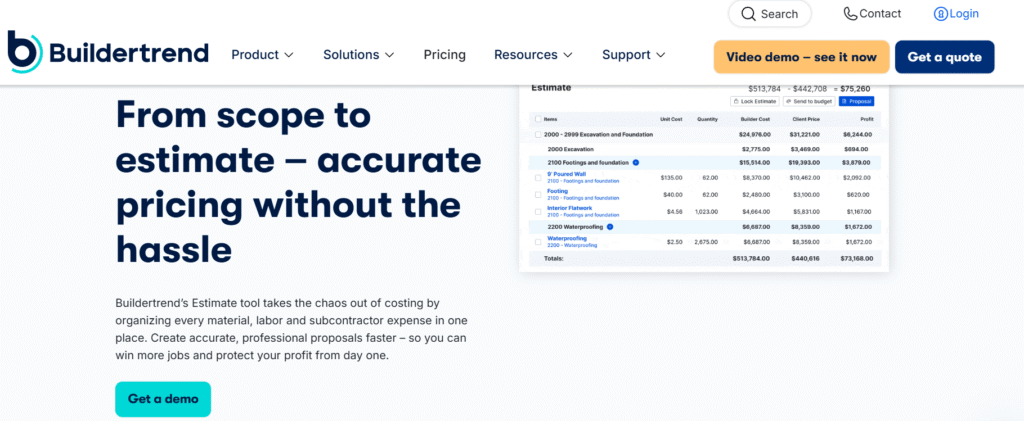
Best for residential builders and remodelers.
The platform focuses on simplifying day-to-day project coordination, client communication, and financial tracking rather than large-scale civil or engineering projects.
Key Features
- Project scheduling & task management: Keeps crews, milestones, and timelines aligned across the entire project.
- Client communication tools: Includes a client portal for updates, selections, and approvals to ensure transparency and smooth decision-making.
- Budgeting, invoicing & change order management: Tracks costs, invoices, and adjustments in real time for better financial control.
- Document & photo management: Centralizes plans, contracts, and site updates for easy access and team collaboration.
Pricing
Buildertrend uses custom pricing. Before filing a request to get the price, you have to mention the company size and construction volume.
#7 Fieldwire

Best for: general contractors, specialty subcontractors, and project managers who require a “mobile-first” solution.
The New Zealand contractors use Fieldwire for on-site coordination and task management. It’s less about full financial control and more about keeping crews, supervisors, and subcontractors aligned in real time.
Key Features:
- Project Scheduling and Task Management: Assigns site to-dos with clear ownership and deadlines and keeps teams accountable.
- Plan Viewing and Drawing access: Enables crews to view and work directly from the latest drawings on site.
- Daily Reporting and Progress Tracking: Documents completed work, site activity, and issues raised to maintain a clear project record.
- Real-Time Team Collaboration: Connects field teams and the office.
Pricing
Fieldwire offers tiered subscription plans based on the number of users.
Construction Software in NZ: Comparison Snapshot
Primary focus and pricing clarity play a major role when choosing the right construction software. To make the decision easier, here’s a quick summary of the key points to keep in mind.
| Software | Target Audience | Primary Features | Price Transperency |
| Buildern | NZ general contractors, remodelers, specialty contractors, commercial builders | End-to-end project management + accounting integration, GST, back-costing, in-built communication, AU/NZ workflows | ✅ Fully transparent pricing with 3 plans from $315 AUD |
| Procore | Mid and large commercial | Health and safety / Ecosystem | ❌No publicly available pricing |
| Oracle | Large-scale engineering, infrastructure | Enterprise controls | ❌ Custom quotes |
| Nexvia | Fit-out, shopfit, specialty contractors, residential | AU/NZ workflows | ❌ Custom quotes |
| Buildertrend | Residential | Day-to-day coordination | ❌ No price listed, quotes upon request |
| Rave Build | Commercial, group builders | NZ-made with a heavy focus on lead management. | ❌ Pricing not available |
| Fieldwire | Site teams | On-site task coordination | ✅ Transparent pricing (per user) |
Bottom Line
In 2026, the cost of losing clients because of slow and inefficient construction project management is higher than the cost of the software.
To overcome labor shortage and tightening compliance requirements, it’s better to bring all workflows into a centralized platform. It’s an efficient way to protect your profit and ensure long-term compliance with NZ building standards.
Choose based on the following criteria:
- Scope and Nature of Your Business: Make sure the software fits the type of work you do
- Compliance with NZ Construction Workflow: See if the features cover local requirements like GST, retentions
- Mobile App Strength: Check if the mobile app lets your site team log progress, upload photos, and access documents in real time.
- Onboarding and Adoption: Make sure getting started is simple and intuitive for all team members.
Most of these providers offer a free demo or trial. I recommend picking the top two that match your business and see how it handles your specific project.

What Construction Software to Use in New Zealand?
The best construction software for New Zealand builders depends on your business size, project type, and workflow needs. To choose the best option, keep in mind accounting integrations, retention, and variation management, which are important for Kiwi builders.
What Is a Construction Site Management Software for NZ?
Construction site management software for NZ is a digital platform that helps builders, site managers, and subcontractors manage daily on-site operations. It typically includes tools for site diaries, task management, scheduling, and subcontractor coordination.
Can Construction Software in NZ Handle GST and Retentions?
Yes, platforms designed for the NZ market include GST integration, retention tracking, and support cost tracking.
![Construction Estimating Software for Small Businesses: 7 Tools Compared [2026 Update]](https://buildern.com/resources/wp-content/uploads/2025/12/BLOG_COVER_Best-Construction-Estimating-Software-for-Small-Businesses-2026-768x501.jpg)