Trade Job Management Software for Contractors: What to Look For in 2026


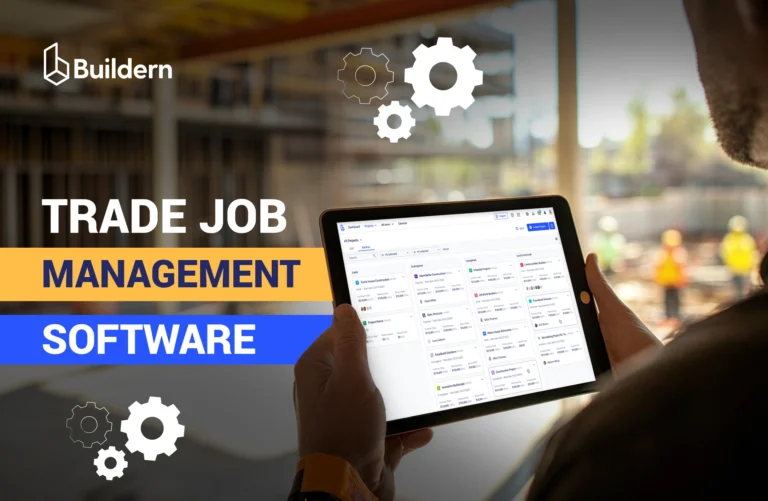
Trade contractors lose time not because they don’t know what to do, but rather because their work is scattered across too many tools.
When field logs, schedules, and time tracking are in different software, it’s difficult to follow everything at once. A contractor is forced to switch constantly, jumping between tools just to answer basic questions like “Where is the crew today?” or “Has this job changed?”
This is exactly the gap that job management software for trade contractors is meant to close.
In this article, I will uncover how comprehensive trade job management software can solve the main problems of contractors and improve the workflow without using multiple tools.
Table of Contents
- What Is Trade Job Management Software?
- Trade Job Management Software vs. General PM Tools
- Core Features for Trade Contractors (with Real-Life Examples)
- General Contractors vs Subcontractors
- Job-Level Financial Visibility for Trade Contractors
- What to Look For Before Choosing Trade Job Management Software
- Final Thoughts

What Is Trade Job Management Software?
Trade job management software is a specialized tool to help trade contractors manage the full lifecycle of their jobs. It usually covers the workflow starting from scheduling, crew assignment, to field updates and completion.
Think of it as the operating system for your business. It bridges the gap between the office staff and the technicians on the road.
Moreover, trade job management software is built for the full range of trade contractors, including electrical, plumbing, HVAC, concrete, framing, and other specialty trades. It addresses trade-specific challenges, such as dispatching crews efficiently, managing work orders, capturing real-time progress, and linking field activity to job costs.
For example, an electrician uses it to ensure job costing accuracy, comparing the estimated labor hours against the actual time tracked via the app’s GPS-verified time clock.
While trade job management software focuses on trade-level execution, it is a crucial part of broader construction management processes.
Read more about project management and construction management:
Trade Job Management Software vs. General PM Tools
Many contractors assume that popular project management tools, for instance, Trello, Asana, or Monday.com, can handle the complexity of running trade jobs.
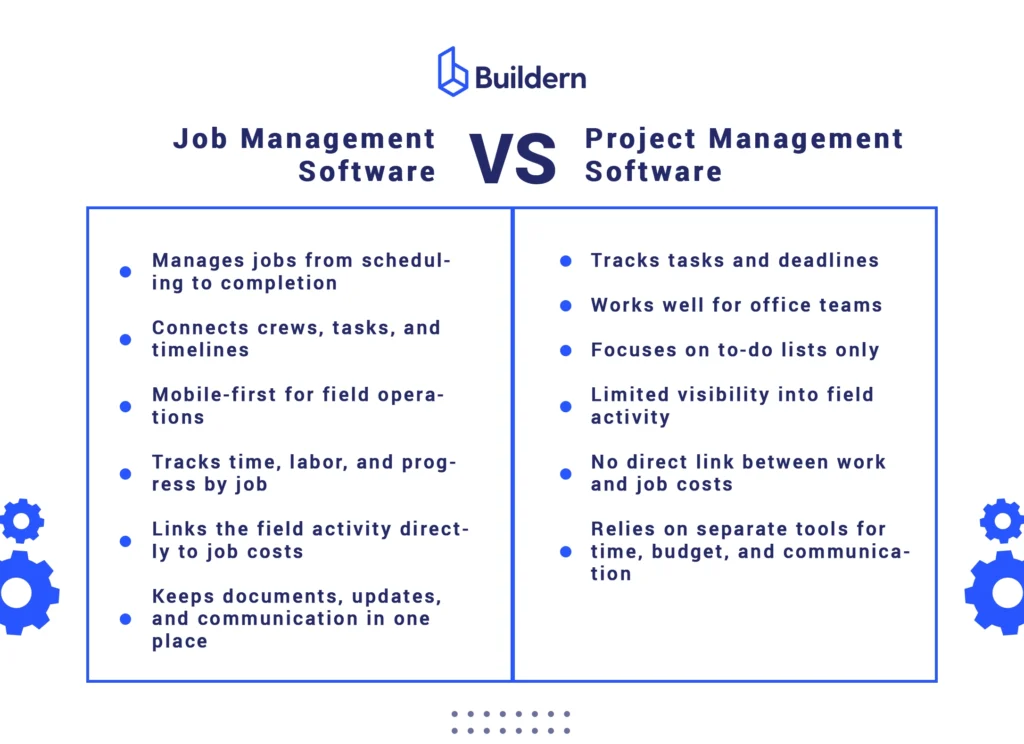
While these platforms work for office tasks, they are not designed for the realities of construction work, unlike specific job tracking software for trade crews. Let me show why.
Why Do General PM Tools Lose?
- No trade-specific workflows: Trades require features like time tracking by job, change order management, and linking field activity to costs. General PM tools treat all tasks the same, with no understanding of construction-specific processes.
- Limited visibility into costs and schedules: Office staff may track tasks, but they cannot easily see the impact of field changes on budgets or schedules. This makes it nearly impossible for a project manager to coordinate multiple trades efficiently.
- No GPS or mobile-first functionality: Tracking crew locations, equipment usage, or field updates in real time is critical for trade contractors. Most generic PM software doesn’t offer integrated GPS tracking or a mobile interface optimized for crews.
Why Job Trade Management Software Wins?
- Integrated Financial Workflows (Estimating to bills): Unlike generic tools, trade software links your initial estimate directly to the bills. It handles complex line items: labor rates, material markups, and vendor bids.
- Real-Time Job Costing Insights: It provides a live dashboard of your project’s financial health. You can monitor actual spending against your estimates as the job progresses.
- Dynamic Visual Scheduling: Trade-specific tools allow you to map out the entire build using Gantt charts. You can set task dependencies (e.g., “electrical can’t start until framing is inspected”), ensuring that crews aren’t standing around waiting and that materials arrive exactly when they are needed.
- Single Source for Documents: Every drawing and bill is stored in one spot. This minimizes misunderstanding between the office team and field workers.
- Client Transparency: Through dedicated client portals, you can share progress photos, schedules, and selections. This builds trust and reduces the number of “status update” phone calls.
Recommended reading:
Core Features for Trade Contractors (with Real-Life Examples)
Now, let’s name some features that can really minimize the problems of a trade contractor.
Project and Job Management
Imagine you’re juggling five different plumbing jobs in a week, each with its own crew, client, and timeline. The software should act as your control center. You can see every job’s status at a glance, who’s assigned to what, and which tasks are pending.
Task Management
A trade contractor can break a framing project into tasks like “measure studs,” “cut lumber,” and “install framing.”
When crews update each task in real time, you know exactly what’s done, what’s behind, and where additional resources might be needed.
Scheduling and Crew Coordination
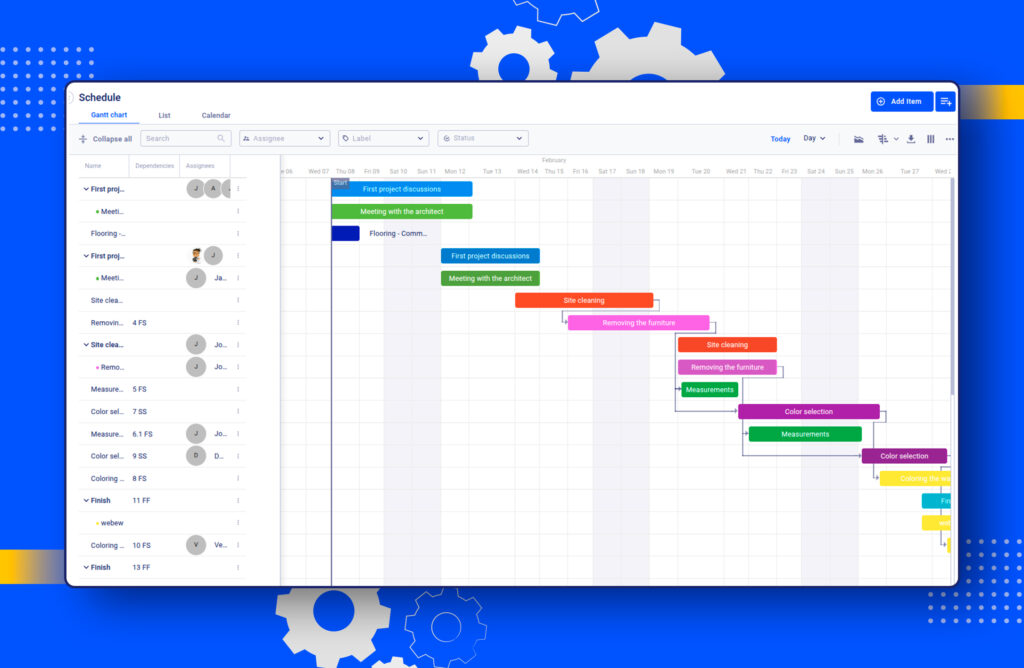
Schedules change constantly: a roof leak pushes a repair forward, a crew gets stuck at a long-running job. Software with real-time scheduling allows you to reassign crews instantly.
For example, if an electrician finishes early at one site, you can immediately send them to another job, keeping crews productive instead of waiting around.
Learn more about scheduling as a part of the construction management:
Change Orders
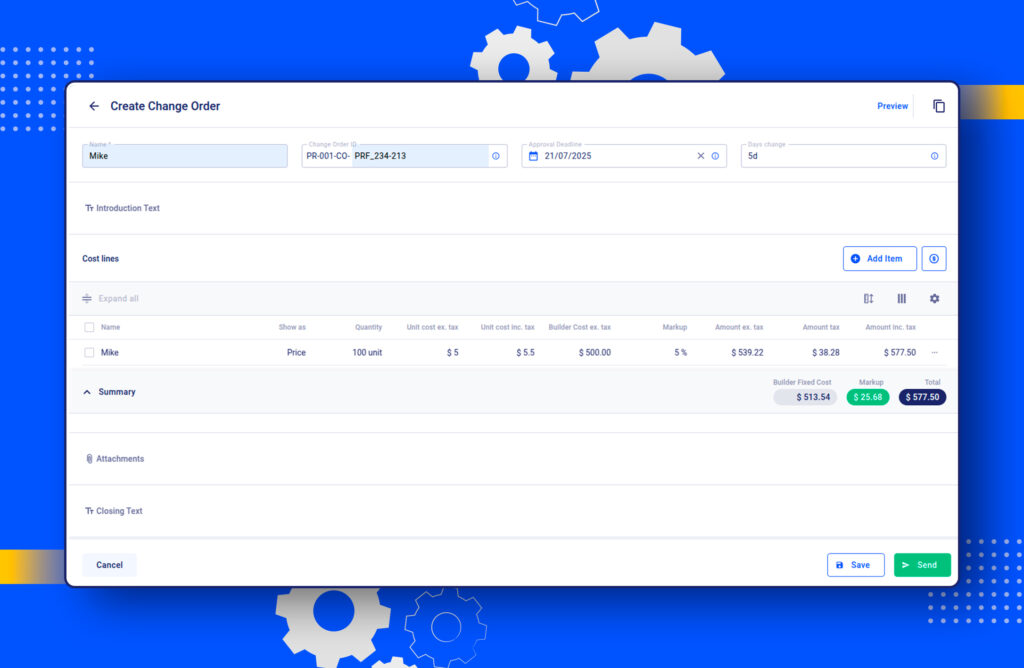
If a client decides halfway through a kitchen renovation to swap cabinets, that change shouldn’t just rely on an email. Trade job management software ensures the update flows directly to the scheduling, labor tracking, and budgeting modules.
This way, the financial and operational impact of changes is visible immediately, and there will be no need to reconcile extra labor, materials, or billing.
Mobile App for Field Operations
A mobile job management app for contractors is no longer optional but essential. It’s important to have a mobile app fully supporting all features, not as an “add-on”.
Clock-in and clock-out features naturally belong here as well. Time is automatically tied to the correct job and crew.
GPS functionality adds visibility, letting you know exactly where crews are. For example, if a truck is stuck in traffic, you can reroute another crew to keep the job on schedule.
QR codes simplify access on site. A crew can scan a QR code on equipment or materials and instantly pull up specs, installation instructions, or photos.
Document Management
Construction work generates a ton of documents, including permits, drawings, and photos. Having them all in one place ensures everyone is working from the latest version.
Imagine a crew starting an electrical job with an outdated plan. The cost and schedules are not the only concerns, as this can even trigger safety issues.
Built-In Communication
Exchanging within a single, job-linked conversation space is more efficient than hanging out in different chats in messengers. The office team sees a message instantly, with full context, and can respond without guessing which project it’s about.
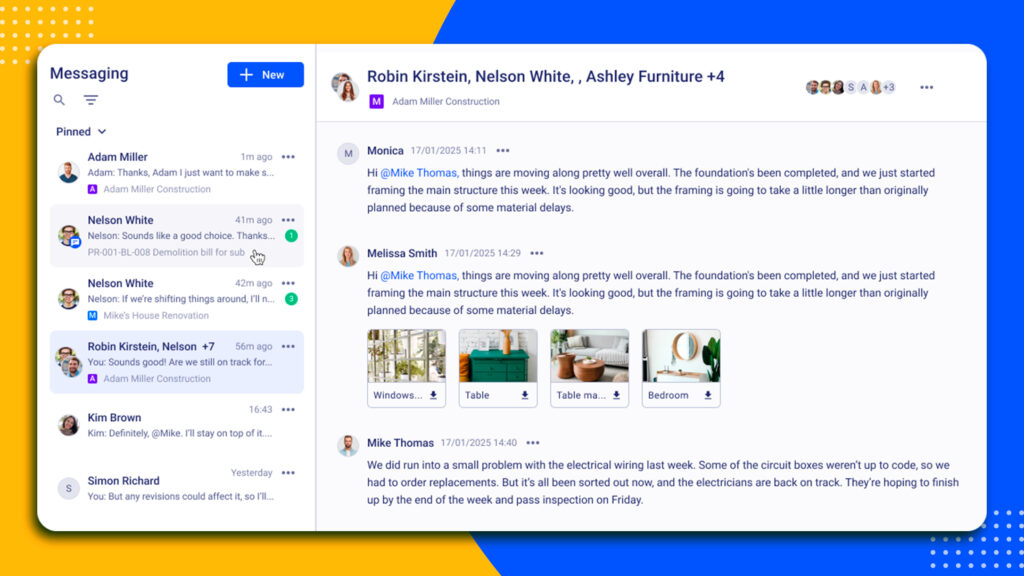
A part of this built-in logic is a subcontractor portal. It’s a hub where a subcontractor can log into the portal to see exactly what applies to them without chasing a GC for updates.
For instance, a subcontractor can see when the work is scheduled, review the latest drawings, and get notified if something changes.
The same works when having a client portal to provide transparent access to information for the project owner.
General Contractors vs Subcontractors
When using job tracking software for contractors, the needs of the general contractor and subcontractor often differ.
For GCs, the focus is on coordinating multiple trades, monitoring budgets, and ensuring that every job stays on schedule.
Construction job management software for subcontractors, on the other hand, is for managing specific tasks within a single trade, making it easier to track progress, labor, and resources.
Subcontractors may not need all the features that GSc uses (like financial management tools), some tools benefit both, for instance, field crew scheduling software.
Job-Level Financial Visibility for Trade Contractors
For contractors, managing jobs without financial visibility is one of the fastest ways to lose profit. It’s harder to track labor hours, material costs, and changes in separate systems.
Trade project management software today has to include financial management at the job level. The main goal is to bring operational and financial data together, so every cost is tied directly to a specific job.
Instead of waiting until the end of the month or after invoicing, contractors can see estimated costs, actual spending, and approved changes as the work is happening.
For example, if labor hours on an HVAC installation are running higher than expected, the issue is visible immediately, not weeks later during billing.
By keeping all job-related costs visible and connected, trade job management software supports more reliable job costing in construction.
Read more about job costing in construction:
Besides, integrated financials give contractors a live view of profitability. Every timesheet entry, material purchase, and change order immediately updates the job’s financial picture.
When a plumbing contractor sees that a residential repipe is at 85% of estimated labor hours but only 60% complete, they can act immediately. They might adjust crew deployment, have a conversation with the client about scope, or prepare documentation for a change order.
💡It’s essential to catch the problem while there’s still time to influence the outcome.
What to Look For Before Choosing Trade Job Management Software
If all the features are reviewed and it seems you are ready to pick, consider some tips on what to pay attention to.
#1 Ease of Use and Adoption
For trade contractors, the simplest tools often get the most use. A powerful software is only valuable if crews and office staff actually use it every day.
User experience in the job management platform is very important. Complicated interfaces, confusing workflows, or excessive training requirements can lead to frustration.
Before choosing a solution, it’s important to consider how onboarding will go. The questions to consider:
- How long will it take for your team to start entering jobs, updating tasks, and tracking hours reliably?
- Are the menus and forms intuitive for crews who are used to working on-site rather than in an office?
- Will you get support from the software to make adoption easier?
Look for software that balances functionality with simplicity, as a system that’s too complex will sit unused, wasting both money and time.
💡Tip: Ask for a trial or demo with your team and test whether crews can complete real-world tasks.
#2 Full Mobile Experience
In 2026, having a mobile app is no longer a luxury, but it is important to have everything (not only some features) working properly.
For contractors, the mobile experience isn’t only for viewing schedules or updating tasks but rather getting the full functionality of the system in the field.
This is especially critical when it comes to the financial side of operations. Timesheets, labor tracking, and job costs need to be updated in real time. If crews’ hours don’t flow automatically into job costing and budgeting, contractors risk inaccurate data and delayed billing.
💡Tip: Check that the mobile app allows crews to complete all field workflows and access necessary features without needing to go back to the office.
#3 Integration with Your Accounting (No Double Entry)
One of the biggest time-wasters for contractors is entering the same information in multiple systems. Hours, materials, invoices, and change orders are often logged in a job management platform, but then manually entered into accounting software.
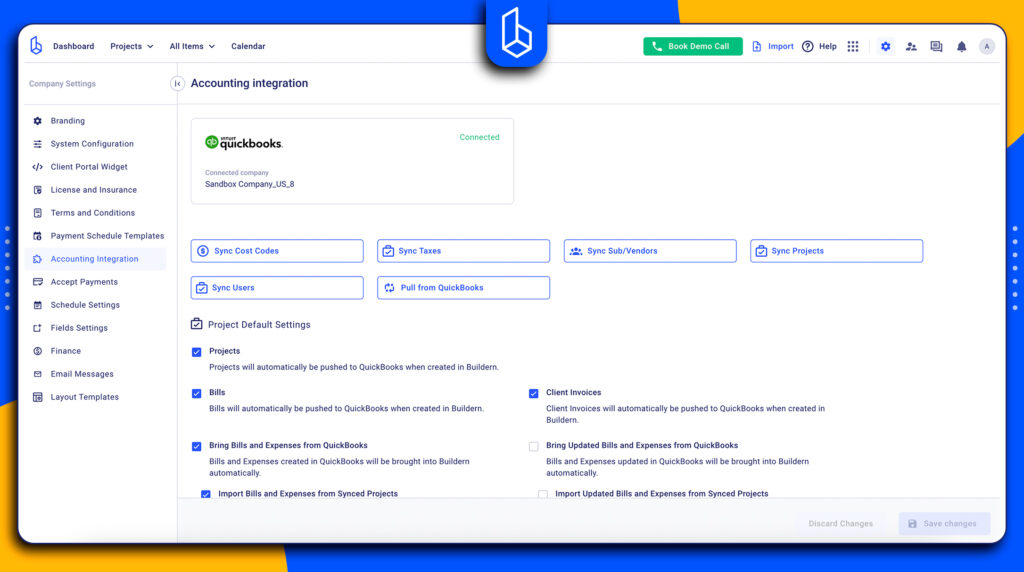
In the case of integrated accounting, labor hours, materials costs, and approved change orders are linked to jobs and reflected in accounting in real time.
💡 Tip: When evaluating software, ask how it integrates with your accounting platform.
#4 Reporting Tools
A good reporting system provides real-time visibility into job status, labor usage, budget performance, and schedule adherence, all in one place.
Reporting tools are a must-have for trade job management software because they turn daily job activity into clear, actionable insights. For contractors managing multiple crews and jobs, having real-time visibility into progress, costs, and schedules is critical to prevent mistakes and keep projects on track.
Essential reporting functionality includes:
- Scheduled report distribution: Automatically send daily or weekly reports to clients, subcontractors, or office staff without manual follow-up.
- Export options: Generate reports for easy sharing and record-keeping.
- Access control: Set permissions so only authorized team members or stakeholders can view or edit reports.
- Visual documentation: Attach photos, videos, or voice notes to reports and logs, giving a clear record of work completed and enhancing accountability.
💡 Tip: Choose a system where reports are easy to generate and share in real time, so updates from the field are visible immediately without chasing emails or phone calls.
Final Thoughts
The goal of a job management software is to ensure every hour is billed and any dollar spent is tracked. If your current platform can’t tell you exactly how much profit you made, it’s time for an upgrade.
To stay competitive, contractors should look at the tools that are mobile-friendly, offer real-time job costing, and have integrated financial tools.
Finally, the best software is the one that has all the features to simplify the process,, not further complicate it for your team.

What Features of Job Management Software Matter Most?
The must-have features depend on the workflow. However, real-time job tracking, scheduling, mobile access for field updates, and job-level financial visibility keep work running smoothly.
What Is the Best Trade Job Management Software?
The best job management software is the one that helps you instead of making the workflow more complex. Of course, it’s better to choose a tool where scheduling, job tracking, communication, and financial data all work together.
Do Contractors Really Need Job Management Software?
As the business grows, managing multiple jobs and several teams at once becomes harder. Job management software reduces missed details, improves crew coordination, and provides real-time visibility into costs and job progress.