Procore Estimating: What It Covers and Where It Gets Complicated


Why is estimating software one of the most searched terms by general contractors? Probably the reason is that estimating is the phase where money is made or lost. Many contractors know their current process has gaps and want to find software that will help streamline the process.
Contractors search for estimating tools, with “Procore estimating” among them, in the following scenarios:
- They’ve heard about software features (in this case, Procore) and want to know what’s actually included,
- Their company is considering buying it, and they need the real reviews (not promotional articles).
- They already use this software for estimating, but wonder if there are valuable alternatives to switch to.
In this article, I will explore what stands behind the Procore estimating and what alternatives to choose if the projects you run need other software.
Table of Contents
- What is Procore Estimating?
- Estimating Software Workflow
- Where Procore Takoff and Estimating Features Get Complicated?
- How to Choose Estimating Software for Your Business
- Procore Estimating Alternative

What is Procore Estimating?
It is an estimating tool primarily designed for mid-to-large-scale general contractors who need to handle high volumes of data.
The software focuses on three core pillars:
- Digital Takeoff: Cloud-based tools that allow users to perform measurements directly on digital plans.
- Estimate Creation: A centralized platform that includes material, labor, and equipment costs.
- Bidding: Tools for sending bids and comparing subcontractor quotes to finalize a project price.
Estimating Software Workflow
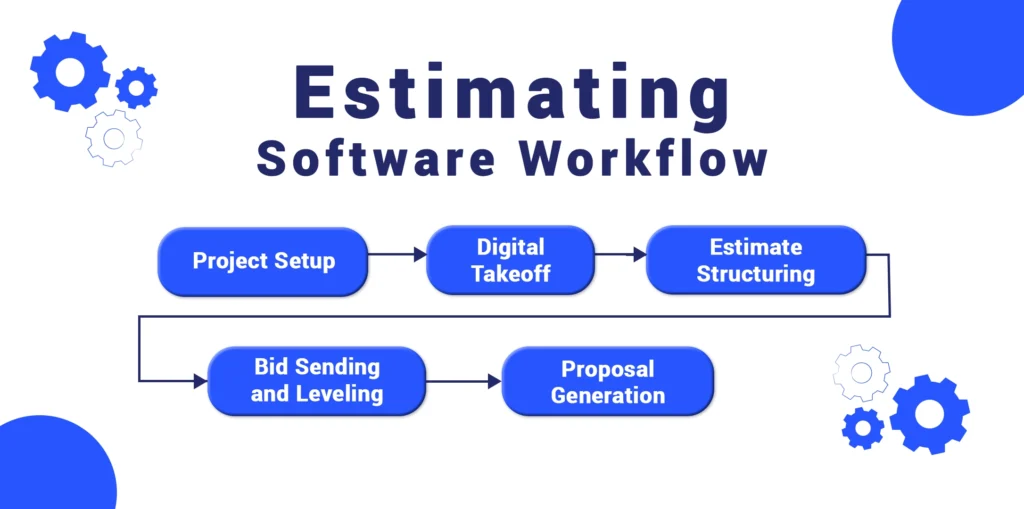
Before digging into how the Procore estimating tool functions in practice, it helps to understand what contractors are trying to confirm before committing time, budget, or internal resources.
In most cases, contractors want to understand:
- What estimating functionality Procore actually includes
- If it’s sufficient as a standalone solution
- Whether it’s expensive (and, yes, it is), as pricing information is limited.
These searches often happen when teams are reassessing how they build estimates, standardize pricing, or evaluate their construction estimating software options as their business grows.
Learn more about the best practices of estimating in our guide:
So, let’s explore the workflow stages.
Step 1: Takeoff
Estimators use digital measurement tools to extract quantities: linear feet, square footage, or volume from project drawings. This process provides a structured set of figures that forms the foundation for cost calculations.
More about takeoff here:
Step 2: Cost Calculation
Once quantities are established, they are linked to a construction cost catalog where unit prices are applied. This step allows estimators to calculate total line-item costs based on predefined pricing data.
Step 3: Bid Leveling
For general contractors, the estimating tool performs bid leveling by comparing multiple subcontractor quotes side by side. This process helps ensure no scope items are missed and highlights discrepancies between bids.
Recommended reading:
Step 4: Proposal Generation
After internal costs and subcontractor bids are finalized, the tool generates a formal construction proposal. The workflow includes formatting costs, line items, and totals.
Where Procore Takoff and Estimating Features Get Complicated?
Having many features is not always good, as the software bills too much for the tool set you do not need. This may be true in the case of Procore.
I do not mention reviews like “it’s difficult to name photos” or “opening drawings take a long time to load,” which are also essential, but the overall impression of user experience.
Let’s see what problems you may face when signing in to the software.
Overwhelmingly Expensive
One of the most frequent concerns contractors raise when researching Procore estimating software is cost. The software price is not publicly available anywhere.
Meanwhile, the feedback on forums and review sites varies. Procore doesn’t publish standard pricing because its fees are custom-quoted. They are based on the annual construction revenue.
On forums, contractors regularly describe Procore expensive subscription models. One thread notes that Procore’s pricing page is essentially a “custom quote request tool,” where a demo or quote request leads to personalized pricing information rather than a published rate.

The practical takeaway from these reviews is that the price is not transparent and is too, as some commenters call it, “prohibitively” expensive.
Procore is prohibitively expensive and, while marketed to specialty contractors, is very clearly geared to the general contractors. I also find the website incredibly inefficient in how it is coded. Almost every action requires a full page reload and you can’t preview PDF files forcing downloads on the regular.” Graham S., G2
“Procore is by far, the most expensive solution that we reviewed. While it more than ticked the tickboxes in terms of functionality, the value for money just wasn’t there and ultimately, we went with another solution.” John, Capterra

Complicated Navigation
The platform is built for enterprise-level coordination. For a residential contractor who needs to build estimates from cost catalogs quickly, the multi-step setup is too complicated.
This structure makes sense for large organizations and institutions rather than residential contractors.
For small and medium-sized contractors, this level of navigation and configuration often means additional training and slower estimate turnaround. These factors directly impact bidding speed and daily efficiency.
“One common downside of Procore is that it can be overwhelming for new users due to the number of tools and features available. Navigating between different modules and understanding permission levels may take time to learn.” Max T, G2
“Maybe a bit too good and have too many features for a smaller company like ours – apparently it is also very costly.” Daryl, Capterra
Learning Curve Is Real
Even contractors who are tech-savvy report that getting comfortable with the workflow takes time. It isn’t just about individual preference, but a common concern across user feedback on review sites and forums
“It takes a lots of training to get use to it, especially if you are using several different modules.” Karic R.,Capterra
The software can require multiple steps to complete workflows and a significant onboarding period before users feel fluent.
How to Choose Estimating Software for Your Business
After reviewing how Procore estimating works and where contractors commonly face difficulties, the next step is to step back and evaluate the estimating needs of a particular contractor.
Estimating software for contractors is not one-size-fits-all. The right tool depends less on the software brand and more on how, when, and why the estimates are created.
1. Decide How Much Complexity You Actually Need
More features don’t always mean better results. While enterprise platforms offer advanced controls, they often add extra steps that slow down the workflow.
The key is choosing software that matches your actual day-to-day work. For small and mid-sized companies, simpler estimating tools usually cover everything you need, without paying for dozens of features you’ll never use.
Find more about the estimating software for small businesses:
2. Evaluate Pricing Transparency
Pricing models vary widely across estimating platforms. Some tools use flat, seat-based pricing, while others’ costs are based on company revenue, project volume, or modules.
Before committing, it’s important to understand how predictable the cost will be as your business grows. Estimating software should support profitability, not introduce uncertainty that makes long-term budgeting difficult.
3. Assess Team Size and Roles
Who builds estimates in your organization, and how much support will they need to get up and running?
A tool designed for large teams with dedicated estimators will look and feel very different than one built for a project manager handling
takeoffs between site visits.
If you’re a small to mid-sized contractor where one or two people manage estimating, overly complex software with enterprise-grade controls can become a burden instead of a benefit.
4. Vendor Support
Just as important is to inquire about the onboarding and training support before you buy. Ask potential vendors:
- Is training included, or does it cost extra?
- Do you get hands-on implementation help, or just video tutorials?
- What happens if we get stuck after onboarding ends?
Proper onboarding directly affects how fast your team adopts the tool and whether it actually gets used. Going live with your new software does not take months, as the work will not stall.
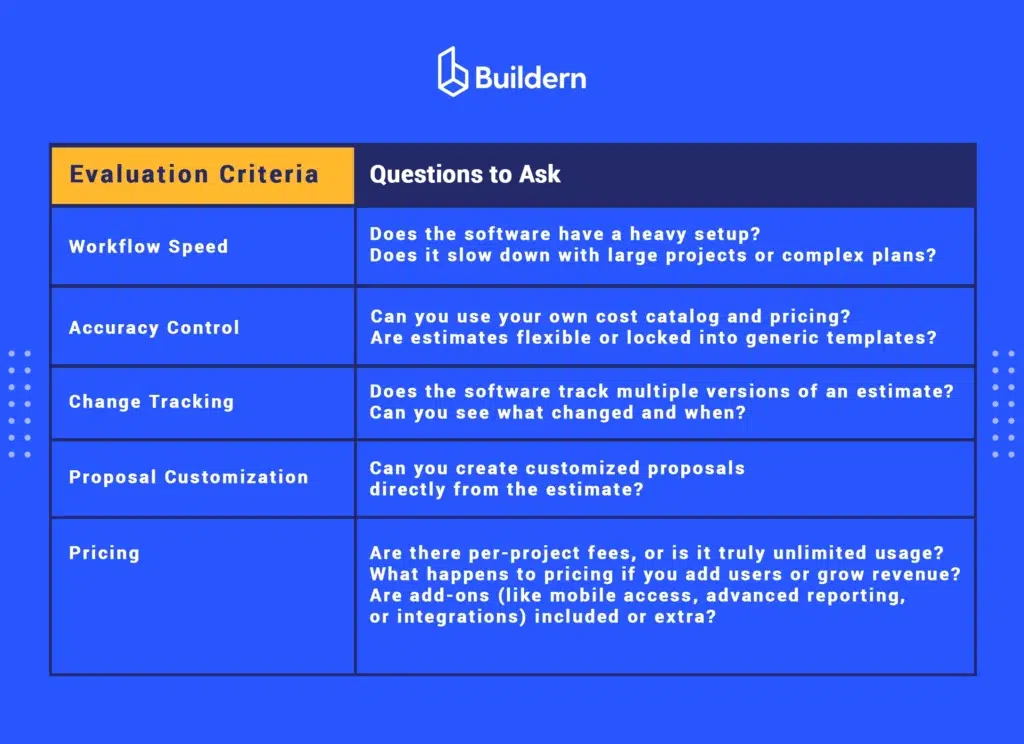
5. Performance Indicators for Your Estimating Tool
When choosing the software, assess performance in terms of accuracy and other factors.
If you evaluated your estimating needs and Procore feels too complicated for you, let’s see an alternative.
Check this blog for an in-depth list of alternatives:
Procore Estimating Alternative
Buildern for Residential and Commercial Contractors (Small Teams Included)
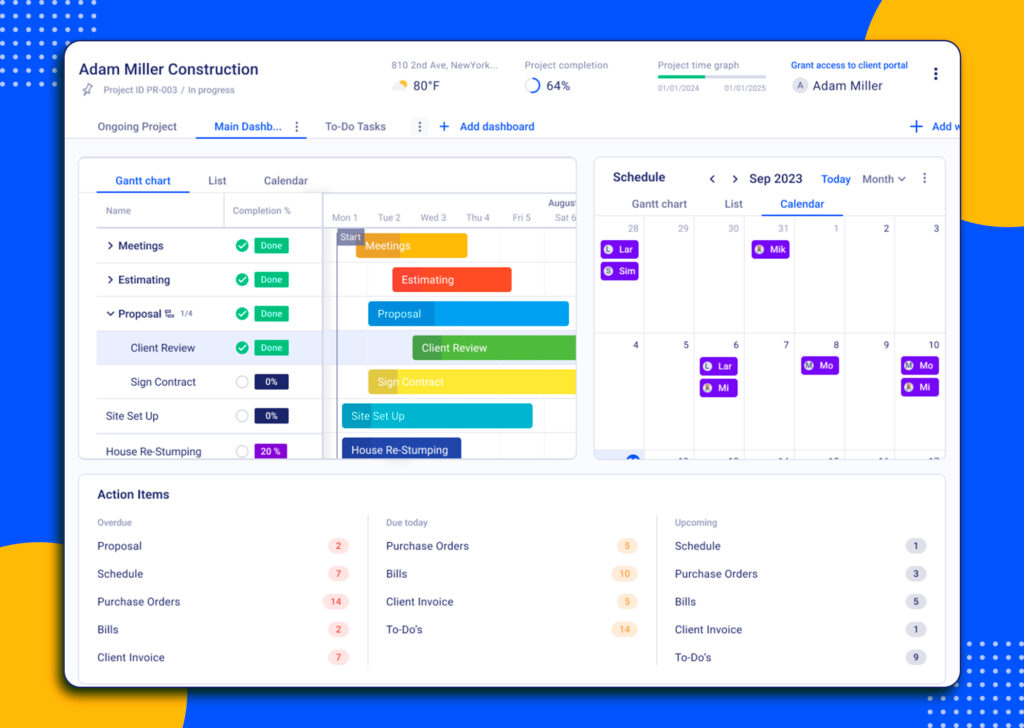
Buildern is an all-in-one construction management platform with a powerful estimating module, a smooth from takeoff to estimate workflow, customized proposal generation, and project management.
Why You Should Consider Buildern?
The preconstruction module of Buildern software includes estimating that is designed to bring clarity and speed within an intuitive platform built for both small teams and larger contractors.
Moreover, Buildern embeds estimating it into a connected workflow where takeoff, cost data, proposals, and financial planning all work together.
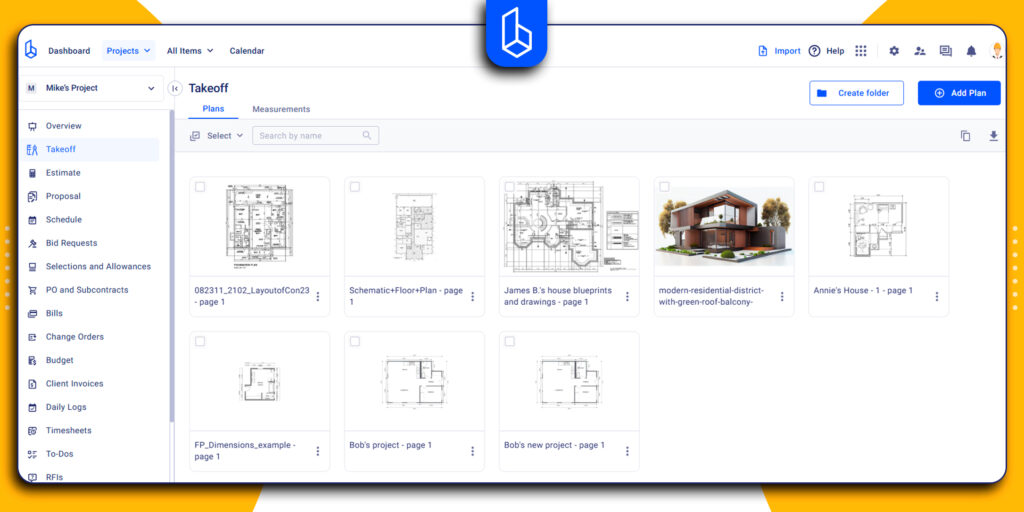
1. Takeoff Integration
Buildern starts with digital takeoff, allowing users to measure quantities directly from project plans or drawings. Linear measurements, areas, and volumes are captured accurately, and these quantities are automatically linked to estimate line items.
2. Cost Application
Costs are applied based on a centralized cost catalog. The catalog is fully editable, so you can update pricing once and have it reflect across all projects. Formulas and custom calculations ensure that estimates remain accurate even when project details change.
3. Bid Requests and Subcontractor Management
Buildern makes it easy to request quotes from subcontractors or suppliers directly within the platform. You can send standardized bid requests, track responses, and compare multiple quotes side by side.
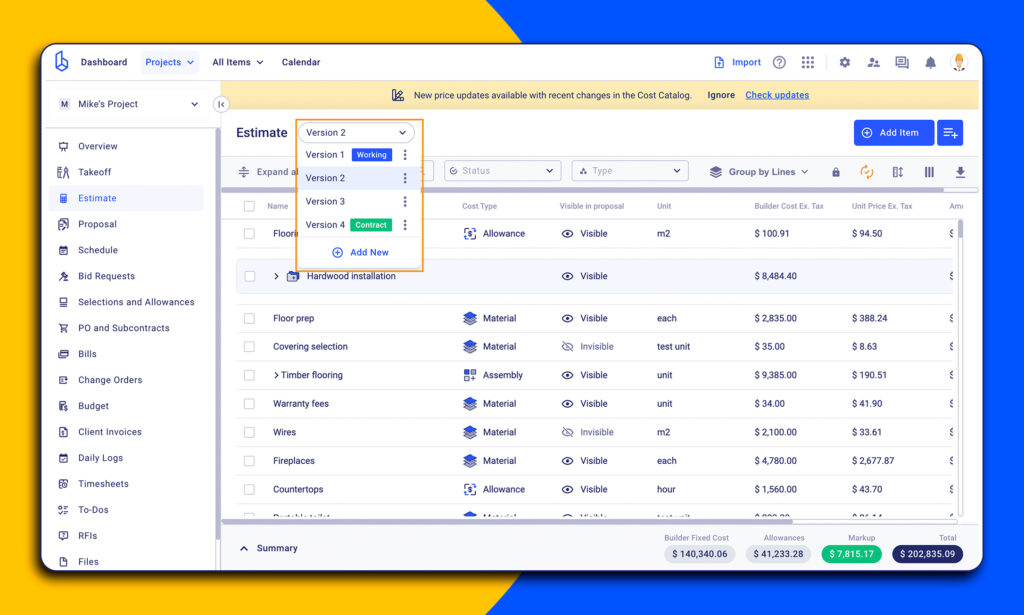
4. Estimate Versioning and Change Tracking
The platform tracks all versions of an estimate. Changes in quantities, costs, or scope automatically flow through the estimate, reducing the risk of miscalculations.
5. Proposal Generation
Finally, Buildern allows you to turn an estimate into a customized proposal in just a few clicks. The proposal can be customized with branding, itemized line items, and detailed breakdowns.
6. Integration with Financial and Project Management Modules
All estimates in Buildern connect to project budgets, accounting, and scheduling modules.
Buildern vs. Procore
Unlike Procore, which is built for large enterprise teams and comes with complex navigation, Buildern is designed to be intuitive, user-friendly, and accessible to small teams as well as larger contractors.
Key Advantages of Buildern over Procore:
- Intuitive Interface: The software is easy to navigate and has a minimal learning curve, allowing estimators to get started quickly.
- Transparent Pricing: No hidden costs or custom quotes based on revenue. Pricing is straightforward and predictable, which makes budgeting easier for small and mid-sized teams.
- Fast Adoption: Teams can implement Buildern without months of onboarding or extensive training.
- Flexible for Small Teams: Unlike enterprise-level tools, Buildern scales to fit your team size, supporting both single-estimator workflows and collaborative projects.
Buildern Pricing
Pricing is transparent and publicly listed with a clearly defined feature set. There is a 7‑day free trial so you can test the platform before committing.
The pricing structure is based on the number of seats, and external collaborators like clients, subcontractors, vendors, and field workers are included at no extra cost.
The plans start from $225 USD/month, billed annually with 2 paid seats. Even the starter plan includes more than a dozen features. The next is a Professional plan with $360 for 4 paid seats. Meanwhile, enterprise-level teams can ask for custom pricing.

What is Procore Estimating used for?
It’s a tool used to create cost estimates for construction projects. It covers digital takeoff, estimate creation using labor, material, and equipment costs, and bid management for comparing subcontractor quotes.
What Are the Drawbacks of Procore Estimating?
Some users report the following challenges:
- An overwhelming number of features for small teams
- Complicated navigation and module setup
- Long onboarding and training periods
- Limited transparency around pricing and expensive quotes based on the company’s revenue
Are There Alternatives to Procore Estimating?
Yes, some alternatives that are more affordable and better suited for companies with different project scopes and team sizes.
![Construction Estimating Software for Small Businesses: 7 Tools Compared [2026 Update]](https://buildern.com/resources/wp-content/uploads/2025/12/BLOG_COVER_Best-Construction-Estimating-Software-for-Small-Businesses-2026-768x501.jpg)