Top 7 Job Tracking Software Options Contractors Use to Have Full Control of Jobs


Any construction project requires 24/7 attention of the general contractor, regardless of the scope and nature of the project. The success relies on the contractor’s ability to track everything, even slight changes that happen on a daily basis.
Thus, having all data tracked on time and stored in the right place is a big challenge for any contractor. The solution is to keep it organized with the construction job tracking software.
There are many options on the market, but general tracking does not always work in the case of construction. In this article, I will review the best 7 job tracking software that can actually fit the flow of a construction project.
Table of Contents
- Benefits of Job Tracking Software in Construction
- Short Checklist of Construction Job Tracking Software Features
- Best 7 Job Tracking Software Reviewed
- How I Selected the Best Job Tracking Software
- Job Tracking Software Buyer Guide
- Final Thoughts

Benefits of Job Tracking Software in Construction
In construction, small issues cannot be overlooked, or they can create huge problems that are hardly manageable over time. Job tracking software for contractors helps stay ahead by giving real-time visibility into what’s happening on site and in the office.
Let’s see what the real benefit is for construction projects.
Schedule Control
General contractors and project managers shouldn’t be “detectives” trying to figure out why a job lags behind. When tasks are tracked daily, it’s possible to spot delays early and reassign crews on time. This is especially important when multiple jobs or trades are running at the same time.
Recommended reading:
Cost Control
Another point is the ability to track costs in real time against your budget. The software captures labor hours, material usage, equipment costs, and subcontractor expenses as they occur.
Thus, you can see cost overruns developing immediately. It’s not like discovering problems weeks later during manual reconciliation.
Learn more about job costing:
Improved Communication
Just as important, it closes communication gaps. Field crews, office staff, subcontractors, and clients all work from the same up-to-date information. Getting updates, sharing files, and exchanging messages between all participants is streamlined.
Field teams can update progress from their mobile devices, office staff can track submittals and RFIs, and clients can receive automated updates without constant manual reporting.
Learn more about RFIs in construction:
Better Decision Making
With historical data from completed projects, you can make more accurate estimates and identify patterns. You’ll know which tasks consistently take longer than planned, which suppliers deliver on time, and which types of projects are most profitable for your company. This data-driven approach replaces guesswork with facts.
Short Checklist of Construction Job Tracking Software Features
To get the full benefits of job tracking software, let me look for key features first. Use this checklist to ensure the platform can do the job in real life. If a software doesn’t check these eight boxes, it’s likely a general task manager tool rather than construction-focused software.
#1 Dynamic task management: Organize jobs into clear tasks, assign responsibilities, and track completion in real time. Everyone knows what’s done, what’s delayed, and what’s coming next.
#2 Field crew scheduling software: Plan who’s working where and when, then adjust schedules on the fly when weather, inspections, or delays hit. This helps prevent crews from standing around or showing up to a site that’s not ready.
#3 Time tracking: Capture labor hours automatically, link them to specific jobs.
#4 Job costing: Monitor estimated vs. actual costs for labor, materials, and subs.
#5 Mobile access and GPS tracking: The “office” is now on the tablet or a smartphone. Allow crews to update progress from the field and track location for better visibility.
#6 Communication tools: Centralize messages, file sharing, RFIs, and client updates (submittals in the case of commercial projects).
#7 Reporting tools: Turn daily field updates into clear dashboards and reports. See which jobs are on track, which crews are most productive, and where delays or cost issues are starting to form.

Best 7 Job Tracking Software Reviewed
It’s important to understand that not all job tracking software is built for construction. Some tools focus on workforce scheduling or basic task tracking, while others can manage complex projects.
In the review, each software is evaluated based on how well it deals with real construction flows.
Buildern: All-in-One Job Tracking Software for Contractors
Best for Residential and Commercial Contractors
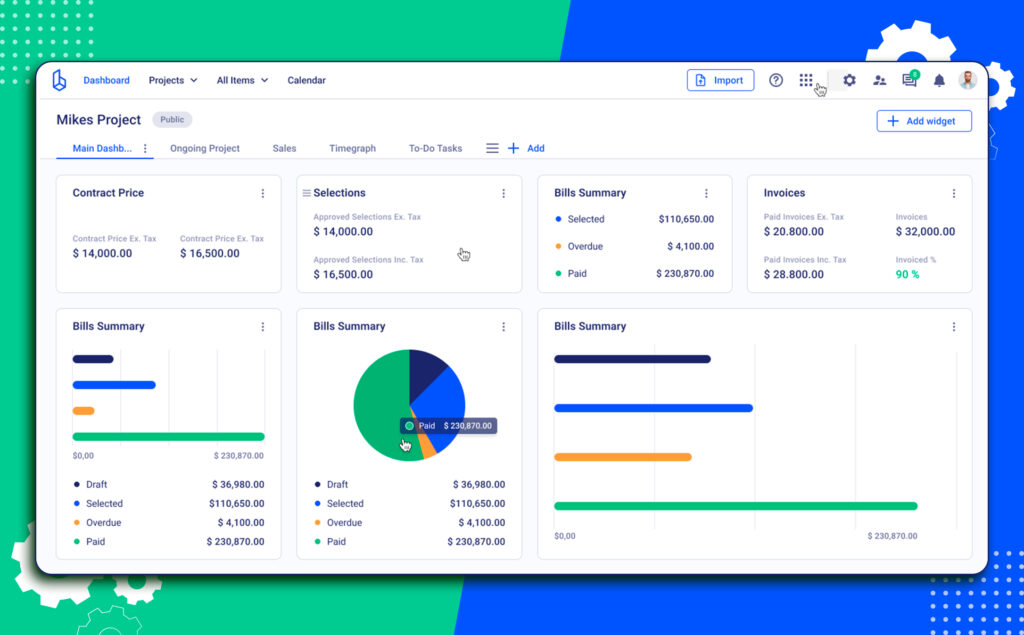
Buildern is designed for general contractors running residential and commercial projects who need full visibility into jobs, crews, schedules, and finances in one system. Unlike general workforce apps, Buildern connects field activity directly to job costs, schedules, and project documentation.
Create and Track Jobs from Start to Finish
It allows contractors to create jobs and break them down into phases, tasks, and assignments that reflect how construction projects actually run. A contractor can set up jobs for concrete work, framing, electrical, or finishing, and assign crews accordingly.
Each job acts as a central hub, bringing together schedules, tasks, documents, photos, RFIs, and financial data. This ensures everyone is working from the same information.
Recommended reading:
Smart Scheduling and Crew Coordination
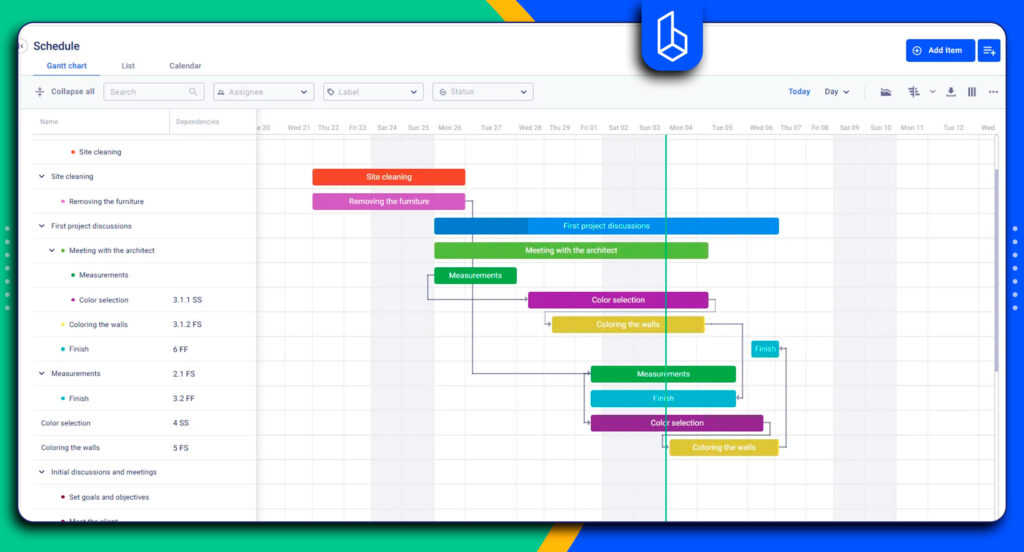
Contractors can plan and adjust crew assignments in real time. If a task runs longer than expected or a crew finishes early, schedules can be updated instantly.
Dependencies between tasks help ensure work happens in the correct sequence, reducing downtime and preventing crews from showing up before a site is ready.
More about scheduling software:
Time Tracking
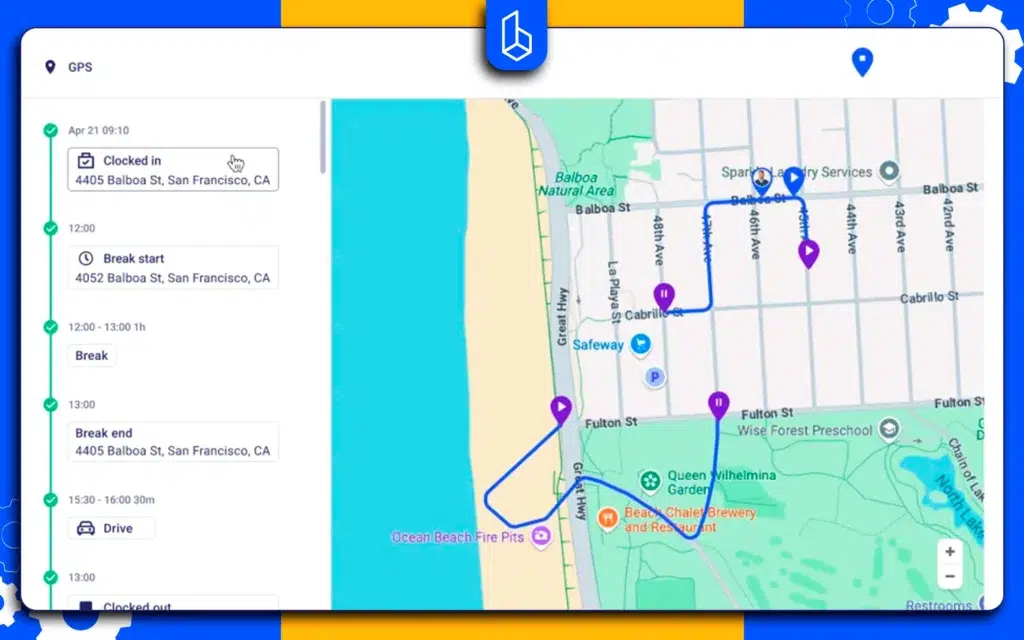
Buildern captures time automatically, linking each crew member’s hours directly to the specific job and task they are working on. Field crews can clock in and out from their mobile devices.
The software also supports GPS tracking, which allows project managers to monitor crew locations and equipment usage.
Field Reporting and Daily Logs
Buildern simplifies daily reporting by capturing field updates, photos, notes, and completed tasks directly from the job site. These updates automatically form daily logs, creating a reliable project record without extra admin work.
Daily reports help project managers track progress, support compliance, and maintain documentation for disputes or audits.
Real-Time Job Costing and Financial Visibility
One of the strongest advantages is built-in job costing. Labor hours tracked in the field, material costs, and approved change orders automatically update the job budget.
Instead of waiting until the end of the month, contractors can see whether a job is trending over or under budget while work is still in progress. This makes it easier to take corrective action early and protect margins.
Recommended reading:
Features Beyond Job Tracking
Here is a short checklist of other construction project management features:
- Change order management
- Financial management (budgeting, payments, AI billing)
- Accounting integration (QuickBooks, Xero)
- Strong preconstruction module (takeoff, estimating, bidding tools)
Pricing
Buildern offers two seat-based plans and a custom package for enterprises. Regardless of the plan, there is access to field workers, clients, subcontractors, vendors, and projects.
The Starter costs $225/mo when billed annually and offers dozens of features, including financial management tools, job tracking, scheduling, time tracking, and reporting.
Why Choose Buildern?
A number one advantage is that Buildern goes beyond basic job tracking and addresses the real operational challenges contractors face on construction projects. While many tools handle tasks or time tracking in isolation, Buildern brings scheduling, job tracking, financial management, and field reporting together in a single workflow.
Fieldwire

Fieldwire is a software for general and specialty contractors to manage tasks, schedules, and field activity across multiple jobsites. Its strength lies in keeping teams organized with task management, punch lists, inspections, and real-time updates from the field.
Pros
Contractors can assign tasks, track progress, add photos and notes, and monitor completion across crews, providing clear visibility into daily work. However, Fieldwire is primarily task- and plan-focused, and does not offer a fully integrated system for job-level financial management, labor tracking linked to costs, or budgeting.
Limitations
Contractors still need separate tools to track material costs, job profitability, or payroll. While it’s excellent for organizing and monitoring field work, it does not provide a single platform to manage schedules, progress, and finances together in one solution.
Pricing
Fieldwire offers seat-based plans starting with a Basic tier for small teams with a payment for 5 users, while in the Pro plan, the fee is paid on per user basis.
Procore
Procore is also job tracking software for construction teams. Its project management tools help teams manage schedules, tasks, RFIs, and plan updates.
Pros
Contractors get visibility into labor, equipment, and material usage across projects, helping teams monitor productivity and manage allocations. By centralizing field data and connecting it to project schedules, managers can optimize resource deployment in real time.
Limitations
Procore is primarily designed for large-scale construction projects and enterprise teams. Its extensive features and modular structure can be overwhelming for small to medium-sized contractors, requiring significant time to learn and implement. Additionally, the software is highly priced, which can make it a costly investment for smaller teams that may not need all the advanced functionality.
Pricing
Procore uses a customized pricing model based on the company’s revenue, scaling with company size and project scope. Plans include unlimited users, but exact pricing requires a personalized quote.
Connecteam

Connecteam is an app focused on workforce management for construction teams as well as other industries.
Pros
Its features include task management, scheduling, time tracking, communication, and compliance. Field crews can update progress, submit forms, track hours, and access job information.
Limitations
While Connecteam provides a range of features useful for job tracking across multiple industries, it is not construction-focused. It lacks tools fit to the construction workflow, such as material takeoffs, estimating, and in-depth job-level financial management.
Contractors needing these capabilities often need additional software to handle budgeting, profitability tracking, or specialized construction reporting.
Pricing
Connecteam offers different plans for small teams that are seat-based, starting at a monthly fee per user.
Read more about top construction apps for field management:
Jobber

Jobber is a field service management app used by home service businesses, GCs, and specialty contractors.
Pros
Jobber helps organize jobs, communicate with clients, and manage basic job details from the office to the field. The platform also supports time and expense tracking, where field teams can clock in and out of jobs and log costs directly from their devices.
Limitations
Jobber works well for managing individual jobs and service-style work, but it cannot cope equally well in the case of multi-phase construction projects that require tight coordination between schedules, crews, costs, and documentation.
It lacks deeper construction workflows such as linking field activity directly to job budgets, tracking costs across project phases, or managing RFIs, submittals, and change orders within the same system.
Pricing
Jobber uses tiered subscription plans that vary by included users and feature sets, with different levels for solo operators and teams. Plans generally start from $149 for a plan intended for one user.
Clockify

Clockify is a time tracking software for construction companies to record labor hours across jobs and crews.
Pros
It allows contractors and field teams to track time via mobile apps, kiosks, or GPS-enabled clock-ins. For construction teams, Clockify is mainly used to monitor hours by project, task, or crew and improve visibility into labor usage.
Limitations
Clockify works well as a standalone time tracking tool, but it is not a full job tracking solution for construction projects. It focuses primarily on capturing hours and basic activity data, without connecting time entries to job budgets, schedules, materials, or overall project financials.
Pricing
Clockify offers a free plan with basic time tracking functionality, while paid plans add features such as GPS tracking, scheduling, and advanced reporting.
Houzz Pro

Houzz Pro is a business management platform used mainly by residential contractors, remodelers, and design-build firms.
Pros
It supports time and expense tracking, allowing teams to log labor hours, track expenses, and associate them with specific jobs, while also handling proposals and invoices.
Limitations
Houzz Pro works best for small residential projects and service-oriented contractors. Its tracking features focus more on billing and client management than on operational control. For contractors managing larger projects or multiple trades, additional tools are often required to gain full visibility into schedules, costs, and field performance.
Pricing
Houzz Pro uses tiered subscription plans based on feature access and business size. Pricing is seat-based and increases as more advanced tools and users are added.
How I Selected the Best Job Tracking Software
To provide an objective review, I first highlighted the must-have features for the job tracking software and evaluated dozens of the tools.
When searching for job tracking tools, the first results indicate non-construction-specific options. However, my goal was to move beyond “generic task management tools” and find those that solve contractors’ and subcontractors’ routine problems.
Several criteria were taken into account in this review:
- Different Segments: One works for designers, the other for mid-sized residential and commercial contractors.
- User Sentiment Analysis: Reviews from Capterra, G2, and SoftwareAdvice, Reddit comments to identify long-term reliability issues.
- Scalability Check: Assessing whether the pricing and feature set could grow from a small setup to a multi-crew enterprise.
- Pricing: If it’s publicly available or has hidden costs.
Job Tracking Software Buyer’s Guide
Let’s sum up what is the operational focus of these platforms and look at the rankings in 2026.
All-in-One Leader
Buildern (2026 Ranking: 4.9/5): Currently leading the pack for residential and commercial GCs. Manages every aspect of the job, starting from the pre-construction level. As a result, Buildern links each phase directly to job costs, calculates labor in real time, and flags potential overruns before the next phase starts.
Field-to-Office Bridge
Fieldwire (2026 Ranking: 4.5/5): The specialist for task-driven field updates. It’s less about the “big picture” budget and more about the foreman on-site. It excels at assigning specific tasks to specialty contractors and tracking them to the minute.
Enterprise Level
Procore (2026 Ranking: 4.5/5): The industry giant for Enterprise-level commercial firms. If you are managing complex contracts and massive app integrations across 20+ job sites, Procore’s ecosystem is the most robust, though it often comes with a higher price tag.
Pure Time and Labor Tracking
Jobber (2026 Ranking: 4.6/5): Works best for speciality contractors handling service-based jobs who need scheduling, basic job tracking, and client communication.
Connecteam (2026 Ranking: 4.6/5): Best for mobile workforce management. It’s built for the HR side of construction: shift scheduling, time tracking, and keeping remote crews connected via a mobile app.
Clockify (2026 Ranking: 4.8/5): A high-performing, lightweight option for electrical or MEP contractors.
Designer-Focused
Houzz Pro (2026 Ranking: 4.3/5): A strong alternative for design-build firms and remodelers. While it offers similar time and expense tracking to Buildern, its ecosystem is more focused on the visual and client-facing side of residential work.
Final Thoughts
Tracking a construction project starts from the first day and continues up to the last minute when the house or a building is delivered to the owner.
Besides, there can be no small detail in the construction, no matter at what stage it appears. The effect is visible when you start losing money, as critical information is not tracked properly.
Job tracking software is useful when used at all stages to monitor and control tasks, schedules, to coordinate field crews, and keep it aligned with the financial data as well.
Why Use Job Tracking Software?
It helps keep every aspect of a project organized, from schedules and tasks to field crew activity and financials. Depending on the project, contractors can use it to track labor hours, material costs, and subcontractor expenses.
What Features to Look for In Job Tracking Software?
Look for features that keep projects organized, costs under control, and teams coordinated, such as:
- task management
- crew scheduling
- time tracking
- job costing
- mobile access with GPS
- communication tools
- reporting dashboards
What is the Best Software for Tracking Job Costs?
The best software for tracking job costs depends on your business size, project types, and workflow needs. The software where budget is linked to labor hours, material expenses, subcontractor costs, and real-time field updates is the most efficient.