Construction Allowances Explained: How They Work and What May Go Wrong


Updated and reviewed in June 2026
One of the most desired situations for any builder is to have an estimated budget as close to the true cost as possible. The more accurate the planned construction budget, the easier and faster project completion will be.
However, the construction industry is all about uncertainties. For example, it’s a common practice for clients to change their minds on finishes during the project. Another usual case is when subcontractor prices shift. So, it’s important to be flexible to be able to mitigate possible variations.
Construction allowances exist to handle exactly these scenarios. They provide a budget room to help you be prepared for unplanned costs that are not always possible to estimate precisely at the beginning.
This article will discuss construction allowances, typical scenarios, how to use them without disrupting the budget, and some crucial factors to consider to improve project cost predictability.
Table of Contents
- What Is a Construction Allowance?
- Types of Construction Allowances
- When Allowances Are Used [Typical Scenarios]
- How to Calculate a Construction Allowance?
- Possible Cases When Allowances May Go Wrong
- Wrapping Up

What Is a Construction Allowance?
In construction, an allowance is an amount included in the contract for a specific material or service whose final details, such as price, quantity, or finish, aren’t yet determined at signing.
Put simply, it’s an estimated figure for selections that still need confirmation.
Allowances help define the total project cost more accurately during early budgeting, even before all selections are finalised. Once selections are confirmed and their actual costs are known, the project’s total cost adjusts accordingly.
- If costs exceed the allowance, the total contract price increases.
- If the costs come in lower, the client receives a credit for the difference.
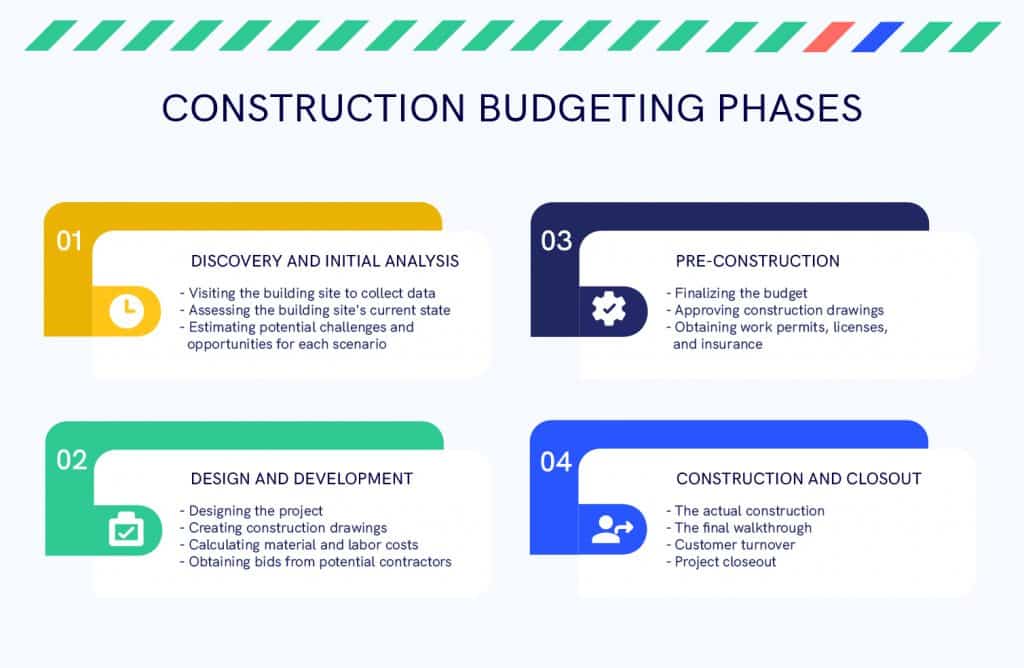
💡PRO TIP: Here are the construction budgeting phases to get a better idea about planning.
Types of Construction Allowances
In general, there are two types of construction allowances: materials allowances and installation allowances.
Material Allowances
Material allowances provide flexibility for items such as finishes, flooring, lighting, and plumbing fixtures. These vary depending on the client’s decisions.
For instance, a client may still be deciding between hardwood and tile flooring. If that choice isn’t made during the estimate, the builder can include an allowance that reflects the average expected material cost.
In this case, material allowances only cover the cost of materials, not the labor to unload, install, or finish them.
Recommended reading:
Installation Allowances
Installation allowances apply when work can’t be fully quantified before starting.
One example of an installation allowance is building a custom home without testing the soil at the construction site. In that case, a builder can’t estimate the costs of laying a home’s foundation. It is unclear whether the ground is all rocky and will need detailed preparation for the foundation.
Below are some common situations where contractors use allowances to maintain budget flexibility.
When Allowances Are Used in Construction [Typical Scenarios]
There are some common situations when the allowances are set by a contractor at the estimating stage. Let’s consider several scenarios.
A homeowner may not yet have selected cabinetry: A builder sets a $9,000 cabinet allowance. The client may choose $8,000, and the contractor stays within the budget. If the client later chooses a more expensive option of $13,400, the gap is added to the contract once the selection is confirmed.
Final flooring materials are not decided yet: A contractor may set a flooring allowance at $6/sq ft for a1,000 sq ft area ($6,000 total). The client may choose either laminate at $3/sq ft or tile at $5/sq ft. In any case, the budget is protected with the allowance.
Subcontractor pricing may not be finalised at the estimate phase: For instance, the scope of electrical works may not be clear at this stage. A fixture-only electrical allowance is set at $5,000.
Equipment costs may change: A $3,000 allowance is set for a rented excavator as it’s not clear whether the excavation works will last a week or 10 days because of earthworks uncertainties.
How to Calculate a Construction Allowance?
There is no fixed formula or calculation behind most construction allowances. In practice, allowances get set one of two ways.
First, is based on their experience. When a contractor runs similar projects and knows how much cabinetry for a similar kitchen will cost. This number is fixed in a proposal. It’s more of an informed estimate based on past jobs and current supplier pricing.
For instance, a contractor who’s done a dozen similar kitchens might set a $9,000 cabinetry allowance. It is roughly where mid-range jobs have landed before.
The second option is setting the figure through actual selections. Instead of a single approximated number, the allowance is built from real quotes as the client makes decisions. There can be several vendor quotes for tiles or external doors for the client to choose from.
How Does It work in Construction Software?
Construction project management platform is used to let you collect all information and cost updates for each project in a single database and invite all your project stakeholders to have timely updates on any project change occurring.
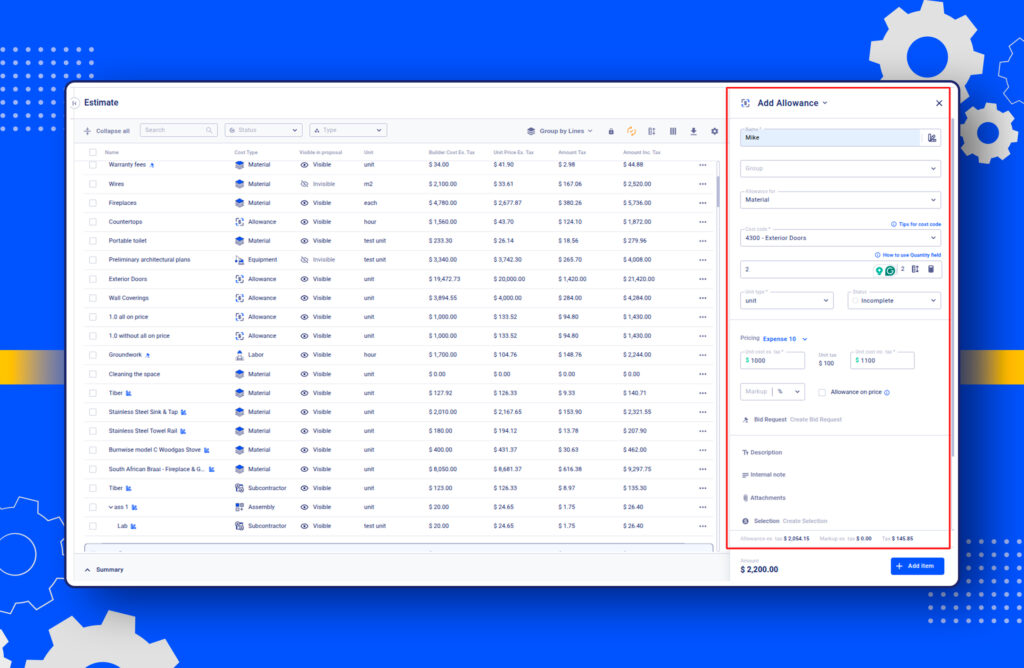
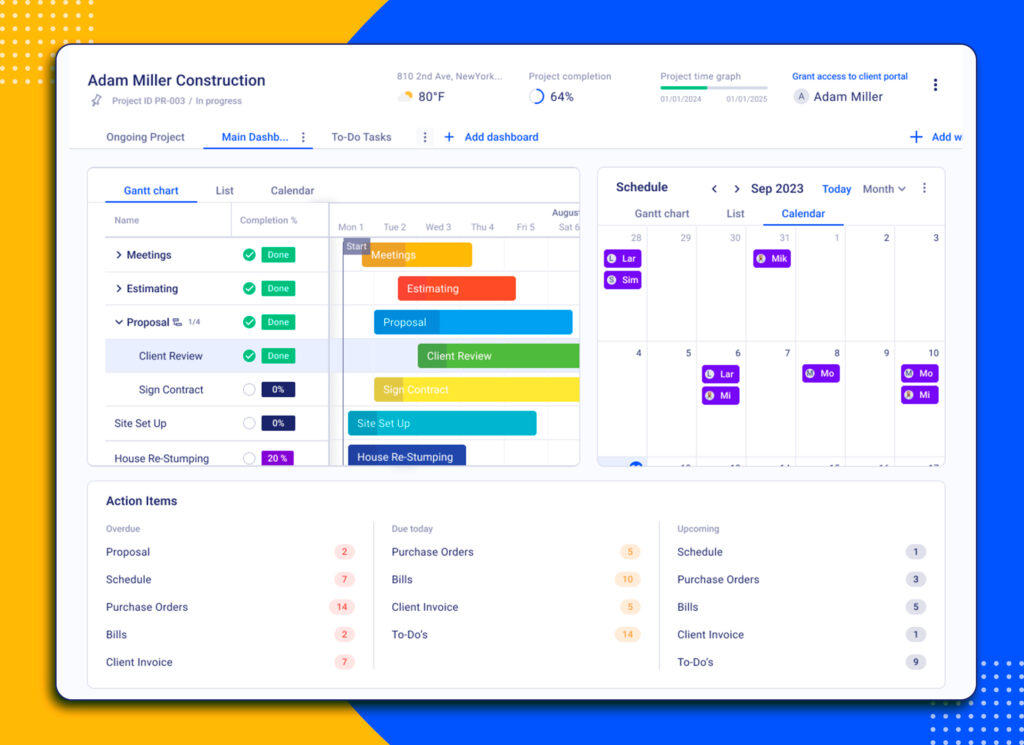
Client selections and allowances in Buildern help you break down costs into corresponding categories, like allowances for the kitchen, bedrooms, bathrooms, etc. With real-time information updates for all project participants, our software guarantees all stakeholders have access to project status and cost updates.
Once you have an allowance created through the estimates, you can share it with the finalised proposal. The client will see the predefined types for each allowance, i.e., material, labour, equipment, etc. Meanwhile, the system will update all the changes in the original budget for better financial management.
Possible Cases When Allowances May Go Wrong (and How to Fix Them)
Allowances may go wrong just as any other component of the construction budget does. It does not mean that the allowance is a bad idea. Something around it may break down and affect the figures in the budget.
For example, the figure was set too low, or the client wasn’t told how the math would show up later. Below are possible cases about the problems that may occur when creating allowances and how to avoid them.
Allowance Was Set Too Low
A flooring allowance may be set at $4.50/sq ft, based on pricing from a job last year. The client picks hardwood at $7.20/sq ft. On 1,800 sq ft, that’s a $4,860 difference, but the client didn’t see it coming.
Why it happens: Allowances often come from memory or an old job cost, not current supplier pricing.
How to Fix It: The real fix is writing it down, so there’s something to point back to later. If the $4.50/sq ft allowance had been documented, the $4,860 gap wouldn’t be a surprise to explain. It would be a documented assumption that the client’s selection simply exceeded.
It often occurs when doing the costs manually, while in Buildern, an allowance created in the estimate carries the assumption forward automatically. The unit price, the quantity, and the cost category it belongs to are all attached to that line.
Budget View Mixes Estimate, Allowance, and Change Order Numbers
A contractor pulls up the budget for the flooring cost code and sees one combined number. The number might be correct, or it might be hiding a mistake, but there’s no way to know which from that view.
Why it happens: A budget can be viewed in different ways. For example, one view is to group everything by cost code, combining the estimate, allowance, and change order amounts into a single total per category. The other groups by line, keeping the estimate, allowances, and change orders in separate sections.
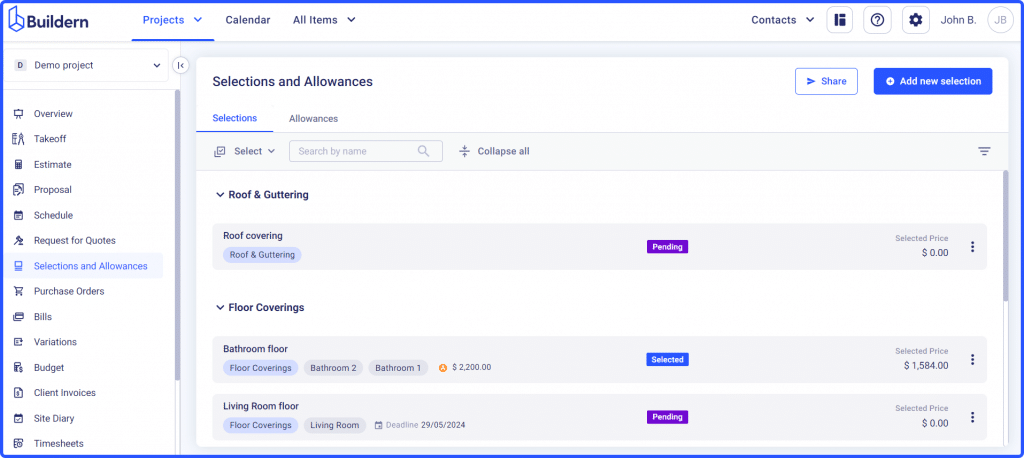
How to Fix It: Match the view to the question. If a client asks why their flooring number changed, that’s a by-line question. If the goal is just to check total spend in a category, the cost-code view is the faster answer.
In Buildern, switching between Group by Lines and Group by Cost Codes can be done easily. The right breakdown is one click away instead of requiring a manual reconstruction from separate documents.
Wrapping up
- Define the construction budget as early as possible, even when project details are still forming.
- Use construction allowances to provide flexibility and maintain transparency during cost estimation.
- Treat allowances as a communication tool between builders, clients, and vendors to align expectations.
- Keep clear records of each allowance item to ensure smoother change management later on.
- With Buildern’s integrated allowances and selections feature, you can create, track, and share allowance items directly from your dashboard for consistent, real-time collaboration.
What Are Construction Allowances?
Construction allowances are placeholder amounts in the project budget set aside for items that haven’t been fully specified yet. They give builders and clients flexibility to move forward with estimating and scheduling before every selection or material choice is finalized.
How Do Construction Allowances Work in a Project Estimate?
Allowances appear as line items in the estimate or contract to cover uncertain costs like fixtures, finishes, or appliances. Once selections are made, the actual cost replaces the allowance amount, and any difference may be adjusted through a change order or variation.
Why Are Construction Allowances Important?
They help maintain progress on design and budgeting while keeping both sides informed about cost expectations. Allowances reduce disputes and rework costs, making it easier to adapt when final product prices vary from initial assumptions.
![Construction Estimating Software for Small Businesses: 7 Tools Compared [2026 Update]](https://buildern.com/resources/wp-content/uploads/2025/12/BLOG_COVER_Best-Construction-Estimating-Software-for-Small-Businesses-2026-768x501.jpg)