



Last updated September 2026
Estimating is one of the first places where a small construction business starts to feel operational pressure. A missed quantity, outdated labor rate, weak markup structure, or rushed proposal can follow the job from bid day into the budget, schedule, and final margin.
That is why I treat estimating software as more than a faster way to measure plans. The right tool should help small builders create cleaner takeoffs, standardize costs, prepare professional proposals, and carry approved numbers into the rest of the project workflow.
This guide compares construction estimating software for small businesses based on practical fit, estimating depth, pricing, takeoff strength, workflow continuity, and real user feedback. Some tools are built for detailed takeoff. Others are better for quick trade estimates, specialty work, or connected estimating-to-budget workflows.
Table of Contents
- Who This Review Is For
- Why Small Construction Businesses Need Estimating Software Today
- How We Evaluated Construction Estimating Software for Small Businesses
- Honest Construction Estimating Software Reviews for Small Businesses
- Estimating Software Costs Small Businesses Should Check Before Buying

Who This Review Is For
This review is written for small construction businesses that need estimating software to make bidding faster, cleaner, and easier to control. That includes small general contractors, residential builders, remodelers, specialty trades, and commercial subcontractors that prepare estimates regularly but do not want a heavy enterprise system.
It will be most useful if your team is trying to move away from spreadsheets, reduce takeoff mistakes, standardize labor and material costs, or connect approved estimates to budgets, proposals, purchase orders, invoices, or job costing.
The tools below are not built for the same type of contractor. Some are strong takeoff engines. Some are better for mobile estimates and invoices. Others work best when estimating needs to connect with the rest of the project lifecycle.
Why Small Construction Businesses Need Estimating Software Today
Small construction businesses make estimating mistakes quickly. A large company may absorb a bad bid across several active projects. A smaller builder usually does not have that cushion.
The pressure often starts before construction begins. Plans change, supplier prices move, subcontractor quotes arrive late, and scope details get buried inside emails or marked-up PDFs. If the estimate is built manually, every update creates another chance for missed quantities, outdated costs, or inconsistent markups.
A better estimating workflow helps the team keep the bid organized from the first takeoff to the final proposal. The strongest tools also carry approved numbers into the budget, purchase orders, invoices, change orders, and job costing reports.
That connection matters because estimating is not only a preconstruction task. It becomes the financial baseline for the job.
How We Evaluated Construction Estimating Software for Small Businesses
Small construction businesses do not choose estimating software by feature count alone. A tool can look strong in a demo and still slow the team down if setup is heavy, pricing is unclear, or estimates cannot move cleanly into the next stage of the job.
For this review, we looked at the areas that matter most when a small team needs accurate bids without adding more admin work.
Takeoff Strength
We reviewed how each tool handles measurements, plan markup, assemblies, quantities, and drawing-based workflows. Some platforms are built around detailed takeoff, while others only support light measurements or line-item estimating.
Estimating Depth
A useful estimating system should help teams build structured estimates with labor, materials, equipment, markups, templates, and reusable cost data. We looked at whether each tool supports real estimating work or mainly helps create simple quotes.
Workflow Continuity
For small builders, the estimate should not disappear after the client approves it. We looked at whether each platform connects estimates to budgets, proposals, purchase orders, invoices, job costing, or project management.
Ease of Use
Small teams rarely have time for a long software rollout. We considered how easy each tool is to learn, how much setup it may require, and whether it fits teams without a dedicated estimating department.
Pricing and Total Cost
The listed price rarely tells the whole story. We reviewed public pricing where available, along with cost factors such as add-ons, user limits, plan restrictions, implementation effort, training, and whether teams may need other tools around the estimating platform.
Public Review Patterns
We checked public reviews from sources such as Capterra, G2, app marketplaces, and software review pages to understand what users consistently praise or criticize. Individual reviews vary, so the goal is to identify repeated patterns rather than cherry-pick one opinion.
Honest Construction Estimating Software Reviews for Small Businesses
When I evaluate the best estimating software for a small construction company, I look at a few specific things.
- The tool has to be easy to use because most small teams don’t have time for long onboarding.
- It also needs enough depth to handle real projects, not just basic material lists.
- Pricing matters, of course, since software budgets are tight.
- And I always check whether the platform can connect to other parts of the workflow, such as budgeting, proposals, purchase orders, or job costing.
Tools that automate these links tend to create fewer headaches once the job starts.
Below are the estimating solutions that fit these criteria. Each one serves a slightly different type of builder, so the best choice depends on how your business operates.
Buildern
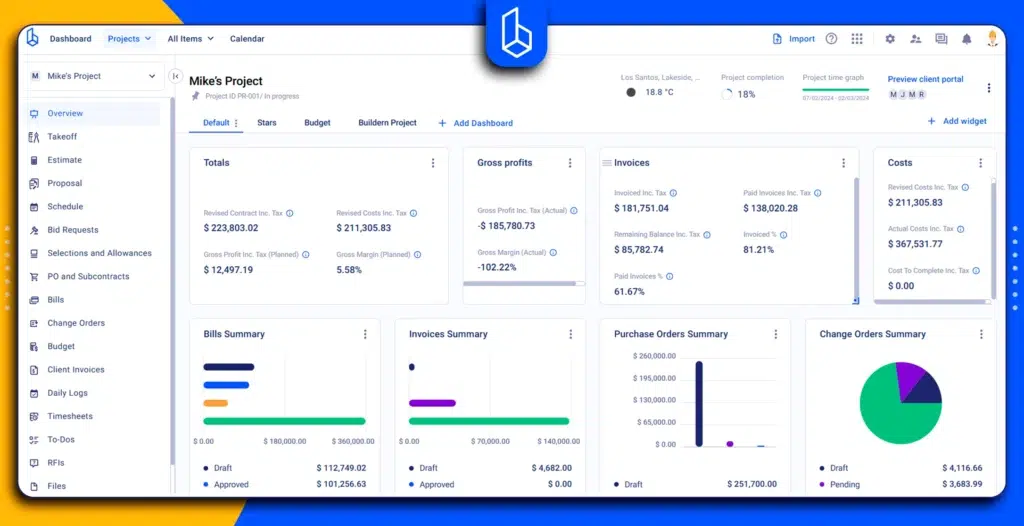
Best for: Small and mid-sized builders that want estimating connected to budgeting, job costing, change orders, purchase orders, and invoicing.
Buildern construction estimating software fits teams that do not want estimating to live as a separate preconstruction file. The estimating workflow connects takeoffs, cost catalogs, templates, budgets, and project financials, which helps small builders avoid entering the same numbers several times across different tools.
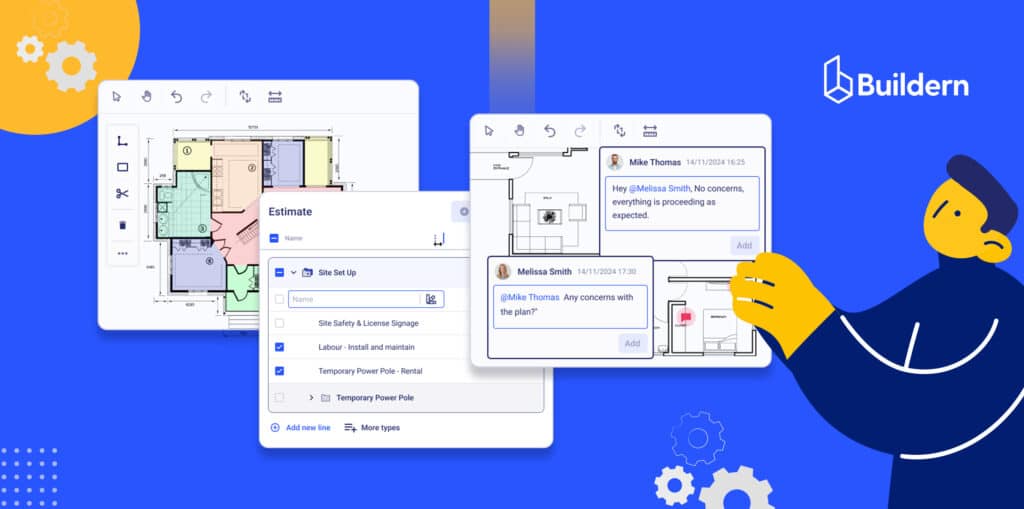
The platform is especially useful when a team needs to estimate to support the rest of the job. An approved estimate can become the project budget, support purchase orders and invoices, and give the office a clearer baseline for job costing.

Buildern also includes AI-supported estimating options, which can help teams build estimates from takeoffs, Excel files, templates, historical project data, or basic project details. That can reduce setup time, but the real value is still in the connected workflow.

What it does well:
- Connects estimating with budgeting and project financials
- Provides AI-estimating tools for smoother workflows
- Supports takeoffs, cost catalogs, templates, and estimate versions
- Helps reduce duplicate entries between the estimate, budget, and billing
- Useful for small teams that need more financial control after the bid is approved
- Keeps estimating tied to the project lifecycle instead of treating it as a standalone document
Practical limitations:
Buildern may feel too feature-rich for a very small trade contractor needs if the business only wants quick mobile estimates or simple invoices. It works best when the team wants estimating to connect with project management, cost tracking, and billing workflows.
Pricing:
Buildern’s pricing starts at 225 USD per month when billed annually and includes two paid users. Additional users are listed separately, so small teams should review how many people need access before comparing it with single-user estimating tools.
Public review snapshot:
“Helps create accurate and detailed estimates has never been easier. Buildern estimating tool allows you to generate precise quotes quickly, with customizable templates that adapt to various project types. The integration of material and labor costs ensures that your estimates are always up-to-date, reducing the risk of unexpected expenses and improving your accuracy.” – JF A., G2
PlanSwift

Best for: Contractors that need a strong desktop-based takeoff tool and are comfortable working in a Windows-based estimating environment.
PlanSwift is strongest as a takeoff engine. It works well for estimators who need to measure plans, apply assemblies, reuse common items, and move quantities into an estimate. For teams that already have their own estimating structure, PlanSwift can be a reliable way to speed up the measurement side of the work.
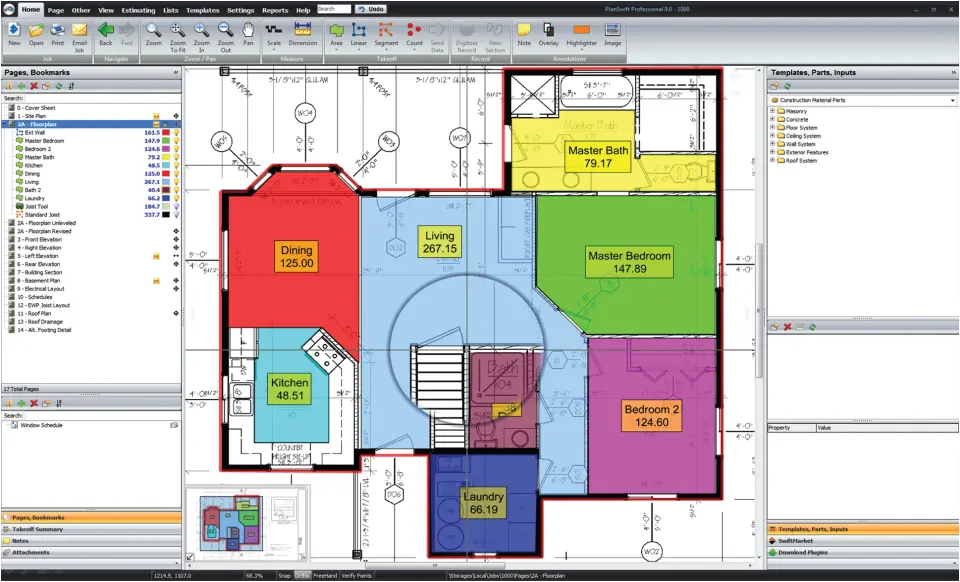
It is less useful as a full construction business system. Once quantities are complete, teams often need to move the data into another estimating, accounting, or project management workflow.
What it does well:
- Strong on-screen takeoff workflow
- Useful for repeat assemblies and trade-specific measurements
- Good fit for estimators who prefer desktop software
- Can save time for teams that perform frequent plan-based takeoffs
Practical limitations:
PlanSwift is not the best fit for teams that want cloud collaboration or a connected estimate-to-budget workflow. Public review summaries also point to bugs and drawing limitations as recurring user concerns.
Pricing and cost factors:
PlanSwift offers annual licensing at 2,000 USD per year, which includes ongoing support, all software updates, and two hours of training as part of the subscription.
Yet, the pricing should be reviewed carefully because add-ons and plugins can affect the total cost. Public review snippets mention that plugins can be useful but expensive, so small contractors should confirm what is included before comparing it with cloud-based alternatives.
Public review snapshot:
Capterra review summaries show that users often praise PlanSwift for ease of use and time-saving takeoff templates. Repeated concerns include bugs, drawing limitations, and the cost of plugins.
“If your team works with large plan files, expect occasional delays during uploads and limited control over layers or vector elements; reviewers say the takeoff tools are fast to learn, but you may need to restart the app when tools freeze mid-task.” – Laura Burgess, Capterra
Stack

Best for: Small and mid-sized teams that want cloud-based takeoff, shared access, and a cleaner way to build estimates from measured quantities.
STACK works well for teams that need to collaborate on takeoffs without passing files around. Because the platform is cloud-based, estimators and managers can review projects from different locations, which is useful when several people touch the same bid.
Its estimating value comes from the connection between takeoff quantities, item libraries, assemblies, and bid documentation. This makes it stronger than a basic measurement tool.
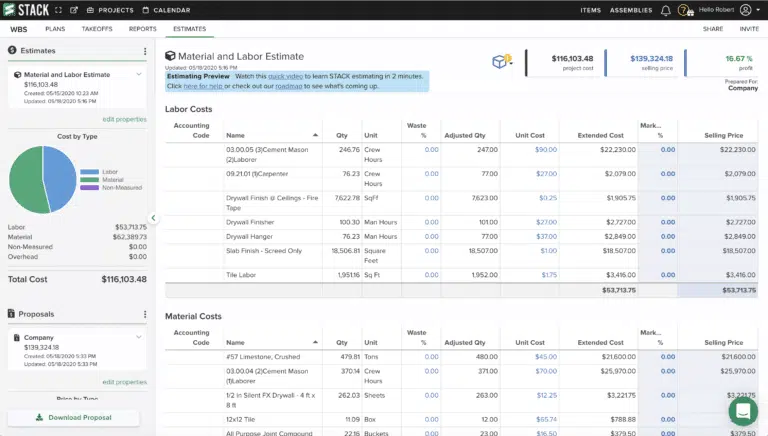
What it does well:
- Cloud-based takeoff and estimating
- Shared workspaces for estimating teams
- Custom item and assembly libraries
- Integrated spreadsheet-style estimating workflow
- Useful for teams bidding on several jobs at once
Practical limitations:
STACK is still mainly a takeoff and estimating platform, so small builders may need other tools for full project management, accounting, billing, or job costing. Some public reviews also mention performance issues around counts or delayed responses during fast takeoff work.
Pricing and cost factors:
Public pricing data lists STACK’s entry plan at around 2,999 USD per year for a single-user takeoff and estimating tool. Small businesses should check user needs, annual billing, feature access, and whether the platform replaces enough manual work to justify the cost.
Public review snapshot:
Users often praise STACK for ease of use, integrated takeoff and pricing, and custom libraries. Common concerns to verify include pricing for smaller teams, performance during takeoff, and the need for separate systems after the estimate is complete.
ProEst

Best for: Contractors that need a more advanced estimating platform with structured cost data, bid analysis, and integration with larger construction workflows.
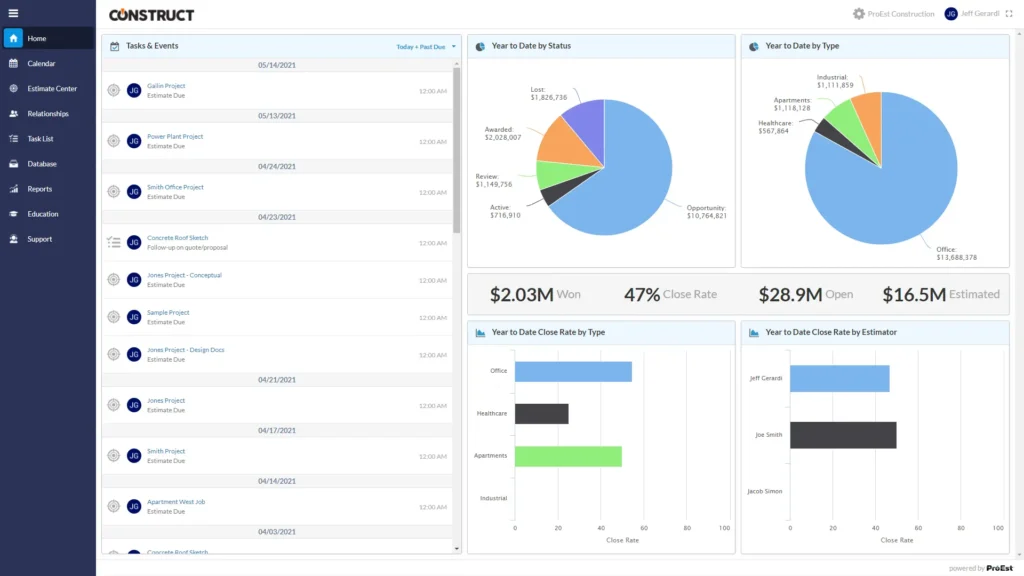
ProEst is stronger than lightweight estimating tools. It is designed for teams that need detailed cost databases, digital takeoffs, proposal workflows, bid day analysis, and integration with other construction systems.
For small businesses, ProEst makes the most sense when estimating volume and project complexity are high enough to justify a more structured platform. It is less likely to be the right first estimating tool for a very small contractor that only needs quick quotes.
What it does well:
- Detailed estimating and cost database workflows
- Digital takeoffs and bid day analysis
- Customizable templates
- Stronger fit for commercial estimating teams
- Integrations with larger construction software ecosystems
Practical limitations:
ProEst can be more than a small contractor needs if the team does not have enough estimating volume or internal structure. Public review summaries also mention that reporting tools can be difficult to navigate.
Pricing and cost factors:
ProEst is generally quote-based, so small businesses should ask about implementation, training, integrations, data migration, the number of users, and whether advanced reporting or database features affect the final price.
Public review snapshot:
G2 reviews summary shows that users often value ProEst for ease of use, estimating accuracy, integrations, and templates. Report navigation appears as one limitation to check during evaluation.
Joist

Best for: Very small contractors and trade businesses that need fast mobile estimates, invoices, and simple client-facing documents.
Joist is not a full construction estimating system. Its strength is speed. A contractor can create a simple estimate, send it to a client, turn it into an invoice, and track payment without sitting down at a full estimating workstation.
That makes it useful for electricians, plumbers, handymen, repair contractors, and small service-based trades that handle lighter scopes and need quick documentation.
What it does well:
- Fast mobile estimates and invoices
- Simple templates and line items
- Easy client-facing documents
- Useful for contractors working in the field
- Low starting price compared with heavier estimating tools
Practical limitations:
Joist is limited to detailed takeoffs, assemblies, job costing, cost databases, and larger construction estimates. Public pricing information also shows that the entry plan limits the number of invoices or estimates per month.
Pricing and cost factors:
Joist starts at a low monthly price (10 USD per month), but small contractors should check the estimate and invoice limits, payment processing fees, plan restrictions, and whether the tool can support their expected bid volume.
Public review snapshot:
Users commonly praise Joist for ease of use and mobile convenience. Repeated items to check include payment fees, plan limits, app availability, and whether the tool is deep enough for more structured estimating.
Measure Square

Best for: Flooring, tile, carpet, and surface contractors that need specialized takeoff and estimating tools for room-based work.
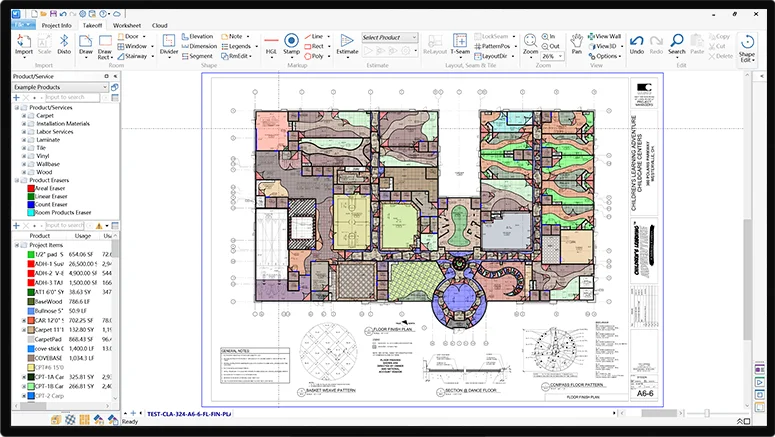
Measure Square is a niche tool, and that is its advantage. It is built for flooring and surface estimating rather than general construction estimating. For contractors working with carpet, tile, hardwood, vinyl, laminate, or similar materials, that specialization can make measurements, waste calculations, layouts, and material planning more accurate.
It is less useful for builders who need a broader estimating system across multiple scopes.
What it does well:
- Flooring and surface-specific takeoff
- Room measurement and layout tools
- Laser measurement integrations
- Waste calculations and material planning
- Quotes, purchase orders, work orders, and invoices in supported workflows
Practical limitations:
Measure Square is not a general estimating platform for GCs or remodelers managing many scopes. It works best when flooring or surface work is the main estimating need.
Pricing and cost factors:
Measure Square uses a per-user subscription model, with plans starting at 540 USD per year for the Retail edition. The Multi-Family and Commercial editions scale up to 1,640-1,970 USD per year per user, depending on project type and feature depth. Optional add-ons, mobile tools, and storage upgrades are priced separately.
Public review snapshot:
Public product information supports Measure Square’s strength as a flooring-focused takeoff and estimating platform. Yet, some users stress its functionality limitations as cited below:
“Walls are very functional on the laptop version, but not on the tablet version. When a change comes out, the only explanation is in the app update, and it is not very informative.” – Rick C., Capterra
Projul

Best for: Remodelers and small contractors that want estimating bundled with CRM, scheduling, project tracking, invoicing, and simple job costing.
Projul is a good fit for small residential contractors that want one system for leads, estimates, jobs, schedules, and client communication. It is easier to adopt than more complex construction platforms and gives smaller teams a practical way to organize their pipeline.
Its estimating tools are useful for teams that rely on templates, repeatable scopes, and quick proposal creation. The platform also supports job costing and budget tracking, which helps contractors compare estimated costs with actual project performance.
What it does well:
- Estimating connected with CRM and project tracking
- Useful for remodelers and residential contractors
- Simple job costing and budget tracking
- Flat annual pricing with no per-user or per-project fees
- Easier adoption for small teams
Practical limitations:
Projul may not be deep enough for teams that need advanced takeoff, detailed cost databases, complex commercial estimating, or more structured estimate-to-budget workflows. Its strength is simplicity and adoption, not heavy estimating depth.
Pricing and cost factors:
Projul starts at 4,788 USD per year. The flat-rate model can be helpful for teams with several users, but very small contractors should compare the annual commitment against their bid volume and estimating needs.
Public review snapshot:
Public reviews on Capterra point to strong job costing, editable templates, and better cost control. The main point to verify is whether the estimating depth matches the team’s project complexity.
Estimating Software Costs Small Businesses Should Check Before Buying
The starting price does not always show the full cost of estimating software. Small construction businesses should compare the subscription with the time and tools required to make the platform useful.
User Seats and Annual Billing
Some tools charge per user, while others use flat annual pricing. A low starting price can increase quickly if several estimators, project managers, or office users need access.
Takeoff and Estimating Limits
Entry-level plans may limit the number of estimates, invoices, projects, sheets, or advanced takeoff features. Joist, for example, lists 5 invoices or estimates per month on its Basics plan, which may be too restrictive for contractors that bid frequently.
Add-Ons and Plugins
Some tools rely on add-ons, plugins, or higher plans for trade-specific workflows, integrations, storage, or advanced estimating features. PlanSwift users have noted that plugins can add value, but also add cost.
Implementation and Training
Advanced estimating platforms may require setup time, cost database cleanup, template creation, user training, and workflow planning. That effort can be worthwhile, but it should be included in the buying decision.
Separate Tools Around the Estimating Platform
Some estimating tools stop after takeoff or proposal creation. Small businesses should check whether they still need separate software for job costing, accounting, invoicing, purchase orders, scheduling, or project management.
Final Thoughts
- Small construction companies benefit the most from estimating tools that simplify takeoffs, keep costs consistent, and turn proposals around quickly.
- The best software is the one that fits your workflow, not the one with the longest feature list.
- Connecting estimating to budgeting and job costing creates steadier projects because the numbers stay aligned from bid to closeout.
- Cloud-based tools help small teams work faster, especially when several people touch the same estimate.
- As competition grows in 2026, accurate estimating becomes a key part of staying profitable and winning the right jobs.

Frequently Asked Questions
What Is the Best Construction Estimating Software for Small Businesses?
It depends on the type of work you do. Buildern works well for GCs, remodelers, and commercial builders who need estimating tied to the whole project lifecycle. PlanSwift is strong for desktop takeoffs. The “best” comes from matching the tool to your expectations and project lifecycle.
What Features Should Small Businesses Prioritize in Estimating Software?
The list can go long, but the essential aspects include:
- Accurate takeoffs
- AI capabilities
- Reusable templates
- A cost catalog
- Markup structure
- Proposal tools
- The ability to convert the estimate into the project proposal without rebuilding it manually.
Can Estimating Software Replace Spreadsheets?
For many small businesses, yes. Spreadsheets still work for simple jobs, but software reduces manual entry, helps prevent errors, and creates more consistent results across multiple bids.
How Does Estimating Software Integrate With Job Costing and Project Management?
Most modern tools let you convert an approved estimate into the project budget. From there, purchase orders, invoices, and change orders all tie back to the original estimate. This gives you a clearer view of how the job performs as construction progresses.


